
Table of Contents >> Show >> Hide
- A Tiny Redesign With Big Consequences
- What Makes the M4 Mac Mini an “AI Desktop”?
- M4 vs. M4 Pro: Same Tiny Box, Very Different Personalities
- Performance That Punches Above Its Footprint
- Compact Design, Serious Workflow Benefits
- Where the M4 Mac Mini Still Comes Up Short
- Who Should Buy the M4 Mac Mini?
- Conclusion: Small Box, Big Statement
- Extended Experience: What Living With the M4 Mac Mini Actually Feels Like
- SEO Tags
For years, the Mac mini was the quiet kid in Apple’s desktop lineup: smart, capable, and a little too easy to overlook next to louder classmates like the iMac and Mac Studio. Then Apple gave it the M4 treatment, shrank the body down to a tiny 5-by-5-inch footprint, doubled down on memory at the entry level, and strapped on a much stronger AI story. Suddenly, the smallest Mac in the room started acting like the smartest one too.
The result is a desktop that feels designed for how people actually work now: multiple apps open, creative tools running, browser tabs breeding like rabbits, and AI features quietly helping in the background. The M4 Mac mini is not just a compact computer. It is Apple’s argument that serious performance, practical AI, and a clean desk can all coexist without requiring a giant tower that looks like it belongs under a NASA console.
A Tiny Redesign With Big Consequences
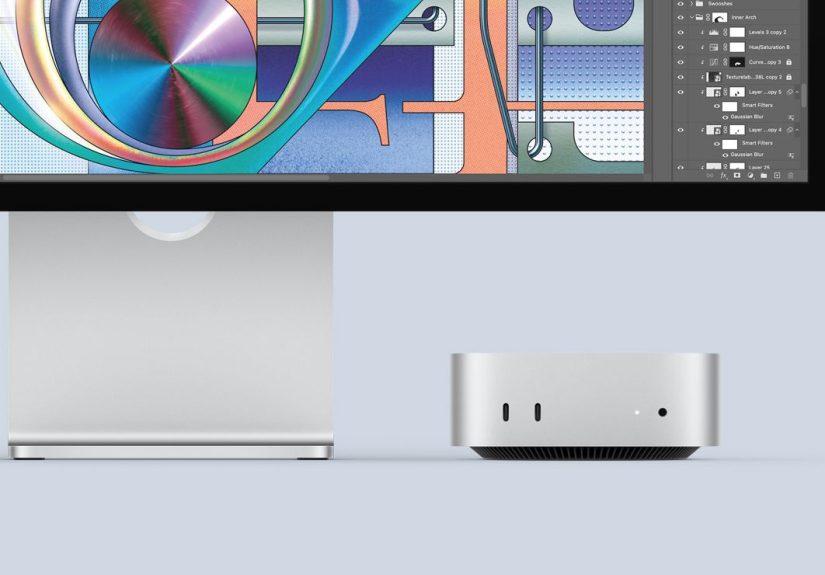
The first thing that makes the M4 Mac mini stand out is its size. Apple gave the Mac mini its first major redesign in well over a decade, and the difference is not subtle. This machine is dramatically smaller than the previous version, yet it does not feel like a compromise. It feels like Apple finally stopped treating “mini” as a cute label and started taking it literally.
This smaller chassis is not just a visual flex. It changes how the computer fits into real spaces. The M4 Mac mini can disappear beside a monitor, slide into a tight studio setup, tuck into a home office shelf, or become the brains of a living-room media station without turning the whole room into a cable jungle. If traditional desktops are the heavy winter boots of computing, the Mac mini is the sleek sneaker that still somehow handles the hike.
Ports Where You Actually Want Them
Apple also made one very practical decision that reviewers noticed immediately: it put useful ports on the front. Two front-facing USB-C ports and a headphone jack make day-to-day use much friendlier. Around the back, you still get HDMI, Ethernet, and three Thunderbolt ports, with the base M4 using Thunderbolt 4 and the M4 Pro upgrading to Thunderbolt 5. That means the little box can go from tidy desk companion to full-on workstation surprisingly fast.
The catch? Apple ditched USB-A, so longtime Mac mini owners with older accessories may need adapters or a hub. Also, the power button now lives on the bottom, which is one of those design choices that makes you wonder whether the industrial design team lost a very strange bet. Is it a deal breaker? No. Is it a little ridiculous? Absolutely.
What Makes the M4 Mac Mini an “AI Desktop”?
Let’s address the buzzword wearing the brightest jacket in the room: AI. The phrase “AI PC” gets tossed around so often these days that it can sound like marketing confetti. But on the M4 Mac mini, the AI story is not just fluff. It is tied to the chip architecture, the Neural Engine, unified memory, and Apple’s wider Apple Intelligence ecosystem.
The M4 Chip Brings More Than Raw Speed
The standard M4 Mac mini ships with a 10-core CPU, a 10-core GPU, and a 16-core Neural Engine. It also starts with 16GB of unified memory instead of the old, stingier baseline that made previous entry-level Macs feel less future-proof. That matters because AI-assisted tasks do not live in a neat little corner anymore. They show up in writing tools, search, automation, photo editing, email summaries, transcription, coding workflows, and systemwide productivity features.
Apple designed the M4 family to handle that hybrid reality. CPU, GPU, media engine, and Neural Engine work together instead of behaving like coworkers who refuse to reply on Slack. The advantage is not just headline performance. It is responsiveness. The M4 Mac mini feels built for the kind of on-device intelligence Apple prefers to emphasize: fast, integrated, and privacy-conscious rather than constantly throwing everything at the cloud and hoping for the best.
Apple Intelligence Finally Feels at Home on Desktop
Apple Intelligence is available on supported Macs running recent versions of macOS, and the M4 Mac mini is a particularly natural fit for it. On a desktop, AI features often feel more useful than gimmicky because the machine is usually connected to a real keyboard, a large display, and a multitasking-heavy workflow. Summarizing notes, rewriting copy, cleaning up writing, searching photos with natural language, organizing tasks, and getting more context-aware assistance from Siri all make more sense when you are working at a desk and juggling multiple windows.
In other words, the M4 Mac mini is not promising robot magic. It is promising fewer annoying little moments during the workday. That may not be cinematic, but it is practical, and practical tends to age much better than flashy demos.
M4 vs. M4 Pro: Same Tiny Box, Very Different Personalities
One of the smartest things Apple did with this release was keep the Mac mini simple on the outside while letting buyers choose how serious they want to get on the inside.
The Base M4 Model Is the Value Hero
The standard M4 Mac mini starts at $599 and includes 16GB of memory and 256GB of storage. That pricing matters. It makes the entry model one of the most attractive desktops in Apple’s lineup for students, home-office users, writers, developers, photographers, and everyday multitaskers who want macOS performance without paying laptop premiums for a screen and battery they may not need.
The base model is the sweet spot for people who want a small, efficient machine that can handle office work, web research, content creation, casual editing, coding, and Apple Intelligence features without turning every task into a thermal event.
The M4 Pro Turns the Mini Into a Mini Monster
Then there is the M4 Pro version, and this is where the Mac mini stops being “surprisingly good for the size” and starts being flat-out intimidating. The entry M4 Pro configuration bumps memory and storage, adds a stronger CPU and GPU, and unlocks Thunderbolt 5. Higher-end configurations reach up to 64GB of unified memory and as much as 8TB of storage.
For video editors, music producers, software developers, 3D artists, and AI tinkerers who want a compact Mac with more headroom, the M4 Pro Mac mini is the model that makes people look twice at bulkier, pricier desktops. It supports up to three 6K displays, which is the kind of capability that makes productivity nerds sit up straighter and whisper, “Now we’re talking.”
Performance That Punches Above Its Footprint
Apple’s official performance claims are aggressive, especially compared with the older M1 Mac mini, and third-party reviews generally agree that the new model feels meaningfully faster and more capable. The base M4 machine is widely seen as a standout value, while the M4 Pro configuration pushes into workstation territory for many real-world tasks.
That performance story is not just about benchmark bragging rights. It shows up in how the computer behaves under pressure. Apps launch quickly. Heavy browser sessions stay fluid. Media workflows move faster. Multitasking feels less like balancing plates and more like using a machine that already knows you are going to open five other things before lunch.
Why Unified Memory Still Matters
Apple’s unified memory architecture continues to be one of the Mac mini’s secret weapons. Because memory is shared across the system rather than split awkwardly between separate pools, workloads involving graphics, media, and AI acceleration can feel smoother and more efficient. For users exploring local AI tools, automation workflows, and larger creative projects, that architecture can make the difference between “this is neat” and “this is actually usable.”
No, the M4 Mac mini is not a replacement for a giant multi-GPU AI server. It is not meant to train frontier models in your spare bedroom while your cat supervises. But for on-device intelligence, creative acceleration, coding, lightweight model experimentation, and everyday productivity, it hits a very compelling middle ground.
Compact Design, Serious Workflow Benefits
The most underrated thing about the M4 Mac mini is how it reshapes desk economics. Because the computer is so small, you can spend more of your budget on the things you stare at and touch all day: a better monitor, a better keyboard, better speakers, faster external storage, or a cleaner multi-display setup. Apple’s mini desktop has always been the “bring your own everything else” Mac, but with M4 it finally feels like that flexibility comes with very few trade-offs.
It also helps that the machine stays visually quiet. In a market full of desktops that either scream “gamer spaceship” or “corporate filing cabinet,” the Mac mini keeps doing what Apple hardware often does best: making power look calm. The design does not ask for attention, which is ideal for people who want the work to be the star.
Three Displays, One Very Small Computer
Apple did not just make the Mac mini smaller. It also made it more ambitious. Depending on the model, the machine can drive multiple high-resolution displays, including setups that would have seemed absurd for something this compact just a few years ago. For analysts, coders, editors, and finance professionals who live in a permanent state of “I need one more monitor,” that matters more than a glossy marketing phrase ever could.
Where the M4 Mac Mini Still Comes Up Short
The M4 Mac mini is impressive, but it is not flawless. Apple still charges steep premiums for memory and storage upgrades, and that can turn a “wow, what a bargain” desktop into a “why does one extra click cost this much?” desktop very quickly. Buyers need to choose their configuration carefully because this is not the kind of machine you casually upgrade later.
Storage on the base model may also feel tight for users working with large photo libraries, video assets, or multiple development environments. External SSDs are a practical fix, but they do add cost and desk clutter. And while the new front ports are genuinely helpful, the absence of USB-A may irritate people with older peripherals that still work perfectly fine and refuse to retire with dignity.
Then there is that bottom-mounted power button. It will not ruin your life. But it will absolutely make you mutter at least once.
Who Should Buy the M4 Mac Mini?
The M4 Mac mini makes a strong case for a wide range of buyers. It is ideal for people who already have a monitor and want the most affordable modern Mac desktop. It is great for students building a dorm-friendly setup, professionals creating a compact home office, and creators who need more power than an entry-level laptop without jumping all the way to a Mac Studio.
It is especially compelling for users curious about Apple Intelligence and desktop AI workflows. If you want a Mac that can handle writing tools, summaries, image-related features, smarter search, code-heavy work, and more demanding multitasking in a machine that barely takes up any room, the M4 Mac mini is one of the easiest recommendations Apple has made in years.
On the other hand, if you need tons of internal storage on day one, depend on legacy ports, or want maximum graphics performance for the heaviest pro workloads, you may find yourself drifting toward a higher-spec M4 Pro configuration or a different desktop entirely.
Conclusion: Small Box, Big Statement
Apple’s M4 Mac mini succeeds because it does not try to be flashy in the wrong ways. It does not rely on oversized hardware, glowing vents, or dramatic industrial theater. Instead, it combines a genuinely useful redesign, stronger baseline memory, excellent everyday performance, and a more believable AI story than many so-called AI PCs have managed so far.
The M4 Mac mini proves that compact design no longer has to mean modest ambition. Whether you buy the base model for value or the M4 Pro version for serious work, you are getting a desktop that feels modern in the ways that count: faster, smaller, quieter, smarter, and more adaptable to real workflows. Apple did not just make the Mac mini tinier. It made it harder to ignore.
Extended Experience: What Living With the M4 Mac Mini Actually Feels Like
The most telling thing about the M4 Mac mini is that after the initial “Wow, this thing is tiny” moment, the conversation quickly shifts to “Wait, it can do all that?” That pattern shows up again and again in hands-on coverage. The machine’s size gets your attention, but its behavior is what wins people over. In everyday use, the M4 Mac mini does not feel like a compromise machine or a budget Apple desktop that you tolerate because it is cheaper. It feels deliberate.
In a typical work setup, the experience is refreshingly friction-free. The computer disappears into the desk rather than dominating it. There is no huge chassis to hide, no power brick to wrestle with, and no sense that you bought more machine than your space can comfortably support. That matters more than people often admit. A computer you enjoy placing in your environment is a computer you are more likely to enjoy using. The M4 Mac mini feels like it belongs in modern spaces where desks are smaller, setups are cleaner, and every cable has the potential to become a household enemy.
Then there is the rhythm of the machine itself. Reviewers consistently describe the base M4 model as quick, responsive, and surprisingly capable for mainstream work, while the M4 Pro version starts to feel like a compact creative engine. That means the Mac mini is not just for email and spreadsheets. It is the kind of desktop that can move from office work to photo editing, from coding to media tasks, and from research to AI-assisted productivity without feeling like it needs a nap between activities.
The AI angle becomes more interesting the longer you imagine using the machine, not the shorter. In a desktop environment, Apple Intelligence features feel less like party tricks and more like a quiet layer of assistance. Rewriting text, summarizing information, organizing content, searching media libraries, and handling context-aware tasks fit naturally into a setup where you are already doing deeper work on a larger screen. This is where the M4 Mac mini starts to make a lot of sense for first-time AI users as well as people who are AI-curious but not interested in turning their workflow into an experiment lab every morning.
At the same time, enthusiasts can see the other side of the appeal. Unified memory, efficient performance, and stronger Pro configurations make the machine attractive for local tools, development workflows, and heavier multitasking than its size would suggest. That does not mean every buyer should rush to the highest-tier model, but it does mean the ceiling is higher than the Mac mini’s tiny body leads you to expect.
The quirks remain part of the story. The power button on the bottom is still odd. The upgrade pricing still stings. The lack of USB-A may force a few adapter purchases. But those complaints feel like speed bumps, not roadblocks. What stands out more is the sense that Apple finally aligned the Mac mini’s physical design, performance level, and market position into one coherent product. The M4 Mac mini is not merely a smaller Mac. It is a smarter one, and for many buyers, it may be the most sensible desktop Apple makes.







 Close
Close