
Table of Contents >> Show >> Hide
- What the VARV Actually Is (and Why People Still Talk About It)
- Key Features That Made It a Cult Favorite
- How the Wireless Charging Works (Without Turning This Into a Physics Lecture)
- Real-World Placement Ideas (Where VARV Makes the Most Sense)
- Compatibility: Will Your Phone Work With It?
- Practical Tips to Get the Best Charging Performance
- Lighting, Bulbs, and Safety Notes You Shouldn’t Skip
- Is VARV Still Worth It Today?
- Smart Alternatives If You Can’t Find VARV
- FAQ
- of “Living With It” Experiences (What People Notice After the Honeymoon)
- Conclusion
There are two kinds of floor lamps in the world: the ones that politely light your room, and the ones that
also babysit your phone’s battery. The VARV floor lamp with a built-in wireless charging pad is firmly in
the second camppart mood lighting, part tiny charging station, part “Where did I put my cable?” prevention plan.
Originally introduced as part of IKEA’s push to blend tech into everyday furniture, VARV was designed around a
simple idea: if your phone already lives next to you on the couch or beside the bed, why not give it a home base
that charges it too? With a Qi charging pad on the lamp’s tray and an extra USB port, it turns a corner of the room
into a low-drama charging zoneno power strip acrobatics required.
What the VARV Actually Is (and Why People Still Talk About It)
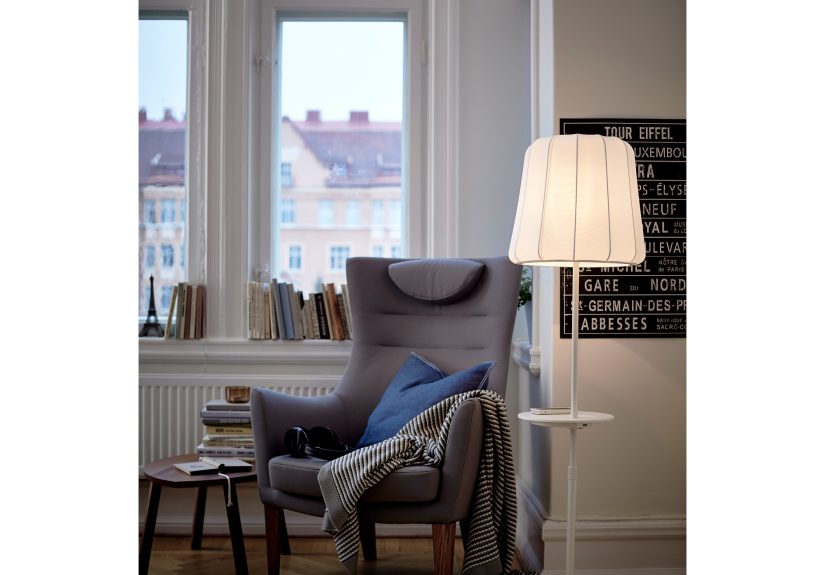
VARV is a floor lamp that includes a small tray/table surface integrated into the lamp’s structure. On that tray,
there’s a wireless charging pad (Qi standard) that starts charging when you place a compatible phone on the marked
spot. Many versions also include a USB port so you can charge a second device at the same timethink phone on the pad,
earbuds or a backup phone on USB.
The rest of the lamp does normal lamp things: it provides a soft, cozy light, and its height can be adjusted so you
can aim that glow where you want itover a reading chair, near a sofa, or beside a bed. The design leans minimalist
(as expected), and the tech is intentionally “invisible” in the sense that the lamp doesn’t scream “GADGET!” from across
the room.
Key Features That Made It a Cult Favorite
1) A wireless charging pad built into the tray
The centerpiece is the Qi wireless charging pad. Qi is the most common wireless charging standard used by phones, which
means many Android phones and modern iPhones can charge just by being placed on the pad (no plugging in).
One important detail: the VARV-era Qi implementation is typically the baseline 5W style of wireless chargingconvenient,
but not the fastest. In everyday terms, it’s great for topping up while you hang out, less great if you need to sprint from
12% to 80% before running out the door.
2) A USB port for “charge two things at once” energy
The built-in USB port is the quiet hero. It’s the option you use when a device doesn’t support Qi, when alignment is being
picky, or when you want to charge something else while your phone claims the pad. If you’ve ever hosted a guest who forgot a
charger (or you are the guest), you already understand the value of “here, just plug in.”
3) Adjustable height + cozy light
Wireless charging is the headliner, but the lamp still has to be a good lamp. VARV is meant to produce a soft, warm vibemore
“wind-down lighting” than “surgical spotlight.” The adjustable height helps it work in different layouts: lower for lounge zones,
higher near a reading chair or a side table.
4) A tray that acts like a tiny landing strip
The tray isn’t huge, but it’s incredibly practical. Phones, glasses, a remote, a small notebook, a cup coasterthis is the kind of
micro-surface that mysteriously becomes the most used surface in the room. The charging pad is built into that same zone, so your
phone naturally lands where it can charge.
How the Wireless Charging Works (Without Turning This Into a Physics Lecture)
Qi wireless charging uses inductive charging: a coil in the charger creates an electromagnetic field, and a coil in your phone receives
that energy and converts it into power for the battery. The key word is “alignment.” If the phone isn’t positioned correctly over the
charging coil, charging may be slow or may not start at all.
That’s why many Qi chargers mark a target spot (often a plus sign). Place your phone on the mark and it usually works. Slide it off-center,
and you might get the modern lifestyle experience known as: “Why is my battery still 19%?”
Heat is also normal in wireless charging. Any time you move energy without a direct metal-to-metal connection, you lose some efficiency as
heat. VARV’s slower 5W charging can actually be gentler in some cases than faster charging systems, but you should still expect the phone to
feel warm while chargingespecially under heavier cases or if your phone is also doing something intense (like streaming video).
Real-World Placement Ideas (Where VARV Makes the Most Sense)
Beside a sofa: the “scroll and recharge” station
This is VARV’s natural habitat. You sit down, put your phone on the tray, and it quietly charges while you watch a show or pretend you’re
“just checking one thing” online. Bonus: the tray holds the remote so it doesn’t disappear into the couch cushions like a magic trick.
In a bedroom: a nightstand upgrade without buying a new nightstand
If your nightstand is already crowded, VARV can act like a secondary surfaceespecially helpful if you’re the type who has a phone, earbuds,
a watch, and maybe an emergency snack lineup. Wireless charging is particularly satisfying at night: drop phone, done.
Guest room: the “I thought of everything” flex
Guests forget chargers. Guests forget cables. Guests forget where they put the cable they didn’t forget. A floor lamp that charges a phone is
basically hospitality with a lampshade. Even if your guest doesn’t use Qi, the USB port can still save the day.
Compatibility: Will Your Phone Work With It?
If your phone supports Qi wireless charging, it should be compatible. Modern iPhones and many Android phones support Qi. Older phones that
don’t have Qi may still charge via the USB port, or with a compatible Qi receiver/case (though those accessories are less common now than they
were when VARV launched).
Two things affect compatibility more than people expect:
- Case thickness: Thick cases, wallets, metal plates, and magnetic accessories can block or disrupt charging.
- Coil alignment: If your phone’s charging coil sits high or low, you may need to experiment with exact placement.
Practical Tips to Get the Best Charging Performance
Find the “sweet spot” once, then make it a habit
For most people, charging becomes effortless after a week because muscle memory kicks in: your hand puts the phone down in the right place without
thinking. If it feels finicky at first, that’s normaltake 30 seconds to find the sweet spot, then repeat it.
Lose the metal ring (temporarily)
Metal rings, magnetic plates, and some pop-style grips can interfere with Qi charging and may increase heat. If your phone uses an accessory
like that, try removing it or switching to a Qi/MagSafe-friendly version if you want more reliable charging.
Use USB when you need “reliable, no-mystery charging”
Wireless charging is convenience-first. USB is convenience plus certainty. If you’re going to sleep and want to wake up with a full battery,
the USB port can be the less dramatic choice.
Lighting, Bulbs, and Safety Notes You Shouldn’t Skip
Because VARV combines electricity for lighting and device charging, it’s smart to follow the safety guidance for both.
Use a compatible lampshade and bulb type as specified for the product configuration you own. Some VARV documentation
emphasizes using an open-top/open-bottom shade and keeping it in the correct (vertical) position, plus using a low-energy
bulb with a maximum wattage limit (commonly listed as 13W for low-energy bulbs in certain instructions).
Also: keep liquids off the tray (yes, even your “carefully placed” coffee), avoid pinching the cord under furniture legs, and if
your outlet is loose or sketchy, fix that before you plug in a lamp that’s going to be used daily.
Is VARV Still Worth It Today?
If you find VARV secondhand or in a leftover inventory situation, it can still be a genuinely useful pieceespecially for casual charging.
But you should buy it with the right expectations:
- Convenience: Still excellent. Charging without thinking is the whole point.
- Speed: Modest compared to newer wireless chargers. Great for topping up; not a “fast charge” superstar.
- Design value: High, if you like clean lines and furniture that doesn’t look like a tech accessory.
- Practicality: The tray + charging combo is a daily-life upgrade in the places you actually live (sofa/bedside).
Wireless charging has evolved a lot since VARV launched. Newer standards like Qi2 add better alignment (often via magnets) and can support higher
power levels on compatible devices. That doesn’t make VARV obsoleteit just means VARV is more of a “slow and steady convenience station” than a
race car charger.
Smart Alternatives If You Can’t Find VARV
If VARV is hard to find in your market, you can recreate the same idea in two ways:
-
Modern floor lamps with shelves + charging: Many newer floor lamps include shelves and built-in charging features (wireless pad,
USB ports, sometimes even AC outlets). These can mimic VARV’s “lamp + landing zone” setup. -
Any lamp + a good Qi/Qi2 charger: Place a wireless charger on a nearby side table and you’ve got 90% of the benefit. If you want the
clean integrated look, choose a charger designed to blend in (low-profile pads or stands).
FAQ
Does the wireless pad charge through a phone case?
Often yes, but thin-to-medium cases work best. Very thick cases, wallet cases, or cases with metal elements can cause charging to fail or run hot.
Can it charge two devices at once?
Many VARV configurations support charging one device wirelessly and a second via the USB port at the same time.
Is wireless charging safe for my battery?
Qi charging is widely used and generally safe, but heat is the main enemy of battery longevity. If your phone gets very warm, try removing the case,
repositioning it for better alignment, or using the USB port instead.
Is it fast enough to replace my main charger?
For many people, it’s best as an “everyday top-up” charger. If you frequently need fast charging, keep a higher-watt wired charger (or a newer Qi2 setup)
for quick refuels.
of “Living With It” Experiences (What People Notice After the Honeymoon)
Once the novelty wears off, the VARV floor lamp tends to become something even better than a novelty: a habit machine. The first week is usually a mix of
delight and minor confusiondelight because your phone charges without you doing the cable tango, confusion because wireless charging is a little like
parking a car: you can’t be “close enough,” you need to be in the spot. Most owners figure out the sweet spot quickly, and after that the motion is
automatic. You sit down, phone lands on the tray, and you stop thinking about battery anxiety for a while.
In living rooms, the lamp often becomes a quiet referee in the eternal “who stole my charger?” debate. Because the charger is built in, nobody can walk off
with it. You don’t have to un-knot a cable pile. You don’t have to crawl behind the sofa to find the outlet that’s somehow always behind the heaviest piece of
furniture. It’s especially noticeable in homes where multiple people share space: VARV creates a default charging zone that doesn’t feel like a tech corner.
It’s just… furniture doing its job.
In guest rooms, the experience is almost comical: guests react like you installed a five-star hotel amenity, even though the lamp is quietly doing what it was
designed to do. People who travel with wireless charging-enabled phones tend to get it immediately. People who don’t will still appreciate the USB port, and
they’ll definitely appreciate a place to set their phone and glasses without balancing them on a paperback novel like a Jenga challenge. Hosts often report the
same pattern: the lamp is one of those “small upgrades” that guests comment on disproportionatelybecause it solves a real annoyance (charging) without making
anyone ask for a cable.
The most common “real life” complaint is also the most predictable: speed. VARV’s wireless charging is convenience-first, not fast-first. If you’re used to
modern fast wired charging or magnetic alignment systems, the older-style Qi pad can feel slow. That doesn’t make it uselessit just changes how you use it.
Instead of “I need 60% in 20 minutes,” it becomes “I’m going to be on the couch for an hour, might as well top up.” A second practical complaint is case
interference. Thick cases, wallet attachments, and certain grips can turn charging into a coin flip. The fix is usually simple (remove the case, reposition the
phone, or switch to USB), but it’s still a thing people notice.
The surprising win is how VARV changes the visual mess of a room. When you stop running cables across side tables and behind cushions, the space looks calmer.
It’s not just aesthetic; it’s behavioral. Fewer cables means fewer “temporary” charging setups that become permanent. And over time, VARV tends to become one
of those items you miss when you’re away from home: you visit someone else’s place, see a normal floor lamp, and think, “Okay, but where do I put my phone so it
charges itself like a responsible adult?” That’s the VARV effectsimple design, quietly addictive convenience.
Conclusion
The VARV floor lamp with wireless charging pad is the kind of product that makes you wonder why more home basics don’t come with small quality-of-life upgrades
baked in. It’s a lamp, surebut it’s also a charging routine you don’t have to remember. If you can find one and you want a tidy, furniture-first way to keep
devices powered in the places you actually relax, VARV still holds up. Just bring the right expectations: it’s built for everyday ease, not record-breaking
charging speed.





 Close
Close