
Table of Contents >> Show >> Hide
- Quick Verdict
- Supernote Nomad vs. Manta: Specs That Actually Matter
- What These Devices Are (and Aren’t)
- The Biggest Differences: Nomad vs. Manta in Real Life
- Software and Workflow: Where Supernote Tries to Earn Its Keep
- Price and Value: What You Pay For (and What You Still Need to Buy)
- Who Should Buy the Nomad?
- Who Should Buy the Manta?
- Alternatives (If You’re Still Not Sure)
- FAQs
- Conclusion: So… Which One Should You Get?
- Real-World Experience (Bonus): What It Feels Like to Live With Nomad vs. Manta
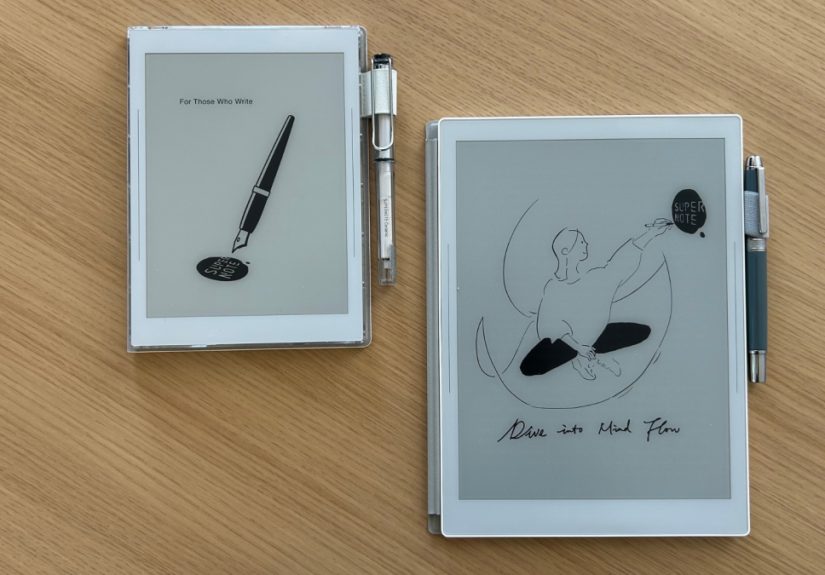
Picking between the Supernote Nomad and the Supernote Manta is like choosing between
a pocket notebook you’ll actually carry and a big desk pad you’ll actually use. Both are purpose-built
E Ink digital notebooks designed to make handwriting feel natural (and keep your brain away from the “just one quick scroll”
trap). But they’re not interchangeable twinsmore like siblings with very different lifestyles.
This guide compares the Supernote Nomad vs Supernote Manta in the ways that matter: writing feel, screen size,
portability, note organization, PDF markup, cloud workflow, and real-world usage. No fluff, no keyword confetti,
and absolutely no “just buy both” (unless your budget is sponsored by Future You).
Quick Verdict
-
Choose Supernote Nomad if you want maximum portability, quick capture notes, a daily to-do hub,
Vibe,
and a device you’ll toss in a bag without reorganizing your entire life first. -
Choose Supernote Manta if you annotate lots of PDFs, write longer notes, sketch more often,
or simply want a bigger canvas that feels closer to a “real notebook replacement” at a desk. -
Writing feel is excellent on both. The real difference is space: Nomad is “carry small, plan big,”
while Manta is “give me room to think.”
Supernote Nomad vs. Manta: Specs That Actually Matter
Specs don’t tell the whole story, but they do explain why one device feels like a pocket journal and the other feels
like a serious work surface.
| Feature | Supernote Nomad (A6 X2) | Supernote Manta (A5 X2) |
|---|---|---|
| Screen size | 7.8-inch | 10.7-inch |
| Screen type | Glass E Ink | Flexible E Ink |
| Resolution | 1404 × 1872 (300 PPI) | 1920 × 2560 (300 PPI) |
| Front light | No | No |
| Weight | About 266 g | About 375 g (with pen loop) |
| Battery | 2700 mAh (replaceable) | 3600 mAh (replaceable) |
| Storage | 32 GB + microSD expansion | 32 GB + microSD expansion |
| OS | Chauvet (Android 11-based) | Chauvet (Android 11-based) |
| Best for | On-the-go notes, lists, quick ideas | PDF markup, long-form notes, sketching |
What These Devices Are (and Aren’t)
The Nomad and Manta are not iPads with fancy screens. They’re closer to a “thinking tool” that happens to save your notes,
organize them, and sync them. The whole point is to keep handwriting front-and-center: low distraction, paper-like feel,
and a workflow designed around notes and documentsnot notifications.
You can read on them (yes, even Kindle content with the Kindle app on supported devices), but you buy a Supernote because
you want to write, annotate, and organize without turning your notebook into a social media portal.
The Biggest Differences: Nomad vs. Manta in Real Life
1) Screen Size: “Pocket Brain” vs “Desktop Brain”
The Nomad’s 7.8-inch screen is perfect for quick meeting notes, daily planning, and capturing ideas as they happen.
It feels like a premium travel notebooksmall enough to carry everywhere, big enough to be useful.
The Manta’s 10.7-inch screen gives you the breathing room your handwriting deserves. If you’re reviewing contracts,
marking up reports, reading PDFs, or writing multi-page notes, the extra space is not a luxuryit’s the difference between
“this is nice” and “this finally replaced my paper stack.”
2) Writing Feel: Both Are GreatManta Has More Runway
Both devices use Supernote’s FeelWrite surface approach to create a textured, controlled writing experience. Reviewers repeatedly
highlight the paper-like sensation and the quality of Supernote’s pen options, which are a big part of the brand’s reputation.
Here’s the practical difference: the Nomad feels like a compact notebook you can write in comfortably,
while the Manta feels like a larger paper pad where you can spread outespecially useful for diagrams,
mind maps, margin notes on PDFs, and anything that benefits from spatial layout.
3) Portability and Ergonomics
If you commute, travel, attend meetings all day, or bounce between classrooms, the Nomad’s size is a superpower.
It fits the “always with you” role without feeling like a second laptop.
The Manta is still thin and fairly light for its size, but it’s more of a “bring it intentionally” device. Think:
desk, backpack, client meeting, studio table. Less: back pocket, coat pocket, “I’ll just hold it while ordering coffee.”
4) Repairability and Longevity: A Rare Flex
One of Supernote’s standout philosophies is repairability. Both devices are designed so parts like the battery
are replaceable, storage can be expanded, and the idea of keeping the same notebook for years isn’t a fantasy.
That matters if you hate e-waste (or you’ve ever had a beloved device die right after the warranty endedso, everyone).
5) Controls and “Little Hardware Things” You’ll Notice Daily
Small hardware touches are where notebook devices quietly win your loyalty. For example, the Manta’s design updates include
quick-action controls (like undo/redo style workflows) that make it feel more fluid during long writing sessions.
On the Nomad, the experience leans into fast capture and navigation, where speed matters more than fancy extras.
Software and Workflow: Where Supernote Tries to Earn Its Keep
Organization: Headings, Keywords, and Finding Your Notes Again
A digital notebook is only “better than paper” if you can actually find things later. Supernote’s approach focuses heavily on
organization featureslike structured note systems and search-friendly metadataso your notes don’t become a haunted attic
full of unlabeled boxes.
In practice, the Manta’s larger screen makes organizing and reviewing longer notebooks feel less cramped. The Nomad can do the same
work, but you’ll feel the difference when you’re scanning pages, sorting projects, and juggling multiple documents.
PDF Annotation: The Manta Advantage Is Real
If you annotate PDFs oftencontracts, academic papers, scripts, design markups, meeting decksthe Manta is simply easier.
The page fits better. The margins make sense. You can write without zooming like you’re trying to land a plane.
The Nomad can absolutely annotate PDFs, but it feels best for “light markup” and “review notes,” not heavy document work.
For many people, that’s fine. For anyone who lives in PDFs, it’s the moment you realize the Manta is the right tool.
Handwriting Recognition and Export
Supernote supports handwriting recognition and converting notes into editable text workflows (how well this feels depends on your handwriting,
your language, and your patience on a given day). You can also export and share notes in common formats, which is essential if you want
your “paper-like” notebook to still behave like a modern device.
Sync and Transfer: Cloud, Drive, Dropbox, and Old-School USB
Both devices support syncing through Supernote’s ecosystem and integrations with services like Google Drive and Dropbox, plus more direct
file transfer options. This flexibility matters for anyone who works across devices or needs to move files in and out without fuss.
Tip: If you’re security-minded, you’ll appreciate having options that don’t require living inside one single cloud silo.
(The best workflow is the one that matches your comfort levelnot the one a marketing page wants you to have.)
Apps: Focused by Design (and That’s the Point)
Supernote devices run a specialized Android-based system, but the experience is intentionally “locked down” compared with general Android tablets.
There are a few focused additionslike a drawing app (Atelier) and reading optionsbecause the product goal is a clean writing environment.
If your dream is “E Ink iPad,” you’ll probably be happier with a more open E Ink tablet line. If your dream is “my notebook but searchable,”
the Supernote approach makes more sense.
Price and Value: What You Pay For (and What You Still Need to Buy)
Pricing shifts over time, but the pattern is stable: Manta costs more than Nomad because it’s larger,
has a bigger display, and aims to be the primary device for longer work sessions.
- Nomad: often positioned as the more affordable, portable entry point.
- Manta: positioned as the premium “main notebook” option.
Also pay attention to what’s included. Depending on the bundle, you may be selecting pens and folios separately. Supernote’s pen lineup is part of
the appeal (especially if you’re picky about grip, weight, and “pen nerd” vibes), but accessories add upso factor them into your comparison.
Who Should Buy the Nomad?
- The Daily Planner Person: You want one place for lists, schedules, quick notes, and lightweight journaling.
- The Meeting Hopper: You’re in and out of rooms all day and need fast capture more than a giant canvas.
- The Minimalist Traveler: You want the “paper brain” experience without carrying an actual stack of paper.
- The First-Time E Ink Note-Taker: You want to test whether a digital notebook fits your life before investing in the larger device.
Who Should Buy the Manta?
- The PDF Annotator: Contracts, research papers, scripts, proposalsif it’s a PDF, you’re writing on it.
- The Long-Form Note Writer: You write multi-page meeting notes, outlines, or study sessions and want space to breathe.
- The Desk Creative: Sketching, drafting, calligraphy practice, or diagram-heavy thinking benefits from the bigger screen.
- The “I Keep Devices for Years” Person: Repairability and expandability aren’t nice-to-haves; they’re the point.
Alternatives (If You’re Still Not Sure)
If you’re cross-shopping, you’ll probably see these names a lot:
- reMarkable devices: famously distraction-light, strong writing experience, and a very focused ecosystem.
- Kindle Scribe: great reading-first device with note features, and usually easier to use in low light due to lighting options.
- Boox tablets: more open Android approach with broader app flexibility (and potentially more distractions).
- Kobo note-capable devices: solid reading ecosystems, depending on the model.
FAQs
Is the Supernote Manta “better” than the Nomad?
Not universally. It’s bigger, more expensive, and better for PDF-heavy and long-form work. The Nomad is better if you prioritize
portability and daily carry. “Better” depends on where and how you write.
Do either of them work well in the dark?
Neither device includes a front light, so you’ll want ambient light (desk lamp, overhead light, etc.).
If night use is a big deal, consider alternatives with lighting.
Can I use them like an e-reader?
Yes, within reason. They support reading formats and (depending on setup) Kindle integration. But the design priority is writing and organization,
not replacing a dedicated Kindle.
Will the smaller screen feel cramped?
If you write large, annotate lots of PDFs, or love big margins, the Nomad may feel tight. If you mostly do lists, meeting notes,
journaling, and quick planning, the Nomad’s size is a feature, not a limitation.
Conclusion: So… Which One Should You Get?
If your notebook life happens everywherecommutes, meetings, class, travelSupernote Nomad is the better fit.
It’s compact, genuinely portable, and still delivers the Supernote “write-first” experience with a sharp 300 PPI E Ink screen.
If your notebook life happens in documentsPDFs, longer notes, sketching sessions, big projectsSupernote Manta is the better choice.
The larger flexible screen gives you room to think, and it’s built to be a long-term tool, not a disposable gadget.
The simplest way to decide: buy the screen size your handwriting wants. Your notes will thank you.
Your wrists will thank you. And your future self will thank you when you can actually find that one brilliant idea you wrote six months ago
instead of discovering it accidentally while searching for “groceries.”
Real-World Experience (Bonus): What It Feels Like to Live With Nomad vs. Manta
Let’s talk about the stuff that doesn’t show up in spec tables: the tiny daily moments where a device either becomes your favorite tool
or quietly moves into the “nice, but…” drawer.
With the Nomad, the magic is how easy it is to say “yes” to it. You don’t need a special bag or a special plan.
It’s the notebook you grab when you’re running out the door, the one you keep near the couch, the one you open for a five-minute brain dump
before bed. The smaller screen nudges you into a practical style of note-taking: short bullets, clear headings, quick lists.
It’s amazing for “capture now, organize later.” The first time you realize you’ve carried it for two weeks straightwithout thinking about it
is when you understand why people love the form factor.
The Nomad also shines in meetings where you don’t want a laptop “wall” between you and other humans. You can write naturally, flip pages quickly,
and keep a running action-item list without becoming the person who’s typing like they’re live-transcribing the entire room.
For students, it’s especially good for lecture notes and study checklistsanything where portability beats page size.
With the Manta, the experience is more like sitting down at a real workspace. You open it and your brain goes,
“Ah, we’re doing serious thinking now.” The bigger screen changes how you write: you naturally create sections, add spacing, sketch arrows,
map ideas, and keep context visible. If you work with PDFs, the Manta feels like the first time you annotate without constantly zooming
and panning. You can mark up a document in a way that resembles paper againmargin notes, underlines, quick diagramswithout fighting the page.
There’s also a mindset shift: the Manta is not the device you casually hold while standing in line. It’s the device you pull out when
you’re ready to review a contract, outline a chapter, draft a project plan, or do deep work. And because it’s designed around writing,
the “lack” of entertainment features stops feeling like a limitation and starts feeling like relief.
Here’s a practical example. Imagine you’re prepping for a Monday morning meeting:
-
On Nomad, you’ll likely make a tight agenda page: bullet points, quick reminders, a to-do list, and maybe a few follow-ups.
It’s perfect for staying on track. -
On Manta, you’ll likely build a mini dashboard: agenda + notes + a rough diagram + a section for decisions + a section for next steps,
all visible without feeling cramped.
The best part? Both devices encourage a healthier relationship with your notes. You write, you think, you organize, you move on.
No app jungle. No “one quick notification.” Just handwriting that stays searchable and sharable. Pick the size that fits your life:
Nomad for constant carry, Manta for maximum workspace. Either way, you’ll spend less time managing your tools and more time actually using them
which, frankly, is the whole point of a notebook in the first place.





 Close
Close