
Table of Contents >> Show >> Hide
- What the Contour Next One is (and who it’s for)
- Design and everyday usability
- Accuracy: what “good accuracy” means in normal human language
- Contour Next strips: performance, convenience, and the “real cost” question
- The Contour Diabetes app: where the meter becomes “smart”
- Setup and pairing: the part where some people sigh deeply
- Pros and cons
- How it compares: other meters and the “CGM question”
- Tips for better results (and fewer “why is this number like that?” moments)
- Bottom line: is the Ascensia Contour Next One worth it?
- Real-world experiences with the Contour Next One
- 1) The “newly diagnosed and slightly overwhelmed” phase
- 2) The “I’m late, I’m hungry, and I need a number” morning
- 3) The “underfilled strip” situation (formerly known as the Strip Sacrifice)
- 4) The app fan vs. the app skeptic
- 5) The occasional Bluetooth tantrum
- 6) The “bring it to your appointment” moment
Finger-stick blood sugar checks aren’t exactly anyone’s idea of a fun hobby. Yet for millions of people, a reliable
meter is still a daily sidekickwhether you’re on insulin, you use a CGM and occasionally “double-check,” or you’re
simply trying to understand what breakfast does to your numbers (spoiler: breakfast has opinions).
The Ascensia Contour Next One is one of the best-known “smart” blood glucose meters in the U.S.
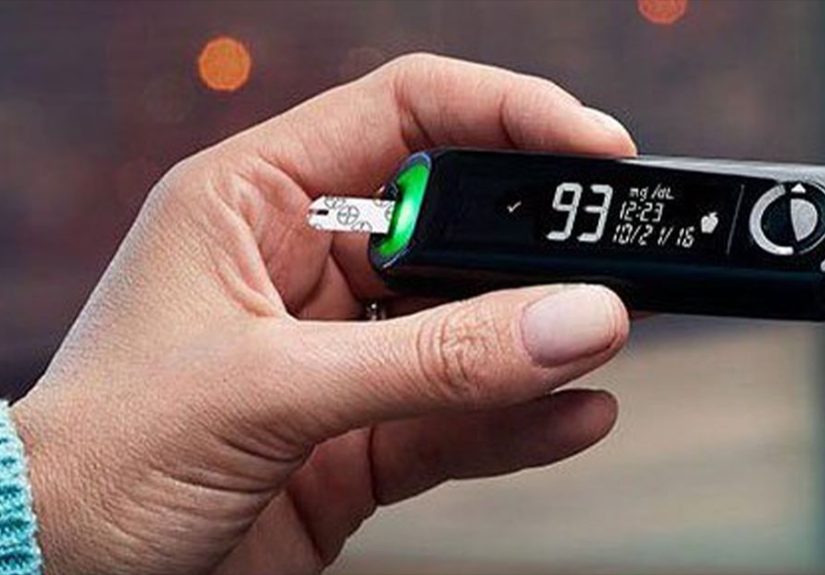
because it tries to make the whole process simpler: fast readings, a color-range indicator, and Bluetooth syncing to an app
that’s meant to be helpful instead of naggy. In this review, we’ll break down what it does well, where it can be a little
dramatic (hello, Bluetooth pairing), and who it makes the most sense for.
What the Contour Next One is (and who it’s for)
The Contour Next One is a blood glucose meter that uses Contour Next test strips and delivers results quickly
(the meter’s specs list a 5-second countdown). It also adds a “smart” layer: it can connect to the
Contour Diabetes app using Bluetooth Low Energy, so readings can sync to your phone for tracking and sharing.
This meter is typically a strong fit if you:
- want a dependable fingerstick meter with modern features (without jumping fully into a CGM),
- already use Contour Next strips and want a more app-friendly meter,
- like seeing “in range” vs “out of range” at a glance, without doing mental math at 6 a.m.,
- need a meter that’s quick to use when you’re out, busy, or just tired of “extra steps.”
Important context: a home meter is for personal use. If you’re making treatment decisions, follow your clinician’s guidance,
and use the meter exactly as the instructions describe.
Design and everyday usability
Fast results and a small sample size
The Contour Next One is designed for speed: the meter’s technical specifications list a 5-second countdown.
It also uses a 0.6 µL blood sample volume, which is small enough that many people find testing less annoying
(still annoying, just… less).
SmartLIGHT: the “traffic light” moment
One signature feature is smartLIGHT, a color indicator built into the strip port. It’s designed to show whether a reading
is within, above, or below your target rangebased on targets you set in the meter/app. In real life, it’s like your meter
is giving a tiny nonverbal reaction: “green = nice,” “amber = hmm,” “red = we should pay attention.”
Second-Chance sampling: a small feature that saves your sanity
If you’ve ever underfilled a strip and felt personally judged by the “not enough blood” message, you’ll appreciate
Second-Chance sampling. The user guide explains that you can apply more blood to the same strip if the first sample
wasn’t enoughunder the right conditions. Practically, this can reduce wasted strips and repeat finger pokes.
Memory, portability, and the basics that matter
The meter’s specs include storage for up to 800 results, coin-cell batteries, and a relatively compact footprint.
That matters more than it sounds: a meter that lives in your bag (instead of at home “because it’s bulky”) is a meter you’ll
actually use.
Accuracy: what “good accuracy” means in normal human language
Meter accuracy is a big deal because a number on a screen can influence decisions. The Contour Next family has been studied
against international accuracy standards (including ISO 15197:2013), and published research has evaluated performance in
clinical settings. That’s one reason the Contour name shows up often in “best meter” conversations.
Still, no meter is magical. Real-world accuracy is affected by technique and context: dirty hands, expired strips, temperature,
and using the wrong strip type can all skew results. Organizations like the CDC, ADA, FDA, and Mayo Clinic consistently emphasize
basics that sound boring but work: wash and dry hands, store strips properly, don’t use expired supplies, and do control-solution checks
when something seems off.
If you only remember one accuracy tip, make it this: if a reading doesn’t match how you feel, re-check and follow your care plan.
Bodies are complicated, and meters are toolsnot crystal balls.
Contour Next strips: performance, convenience, and the “real cost” question
The Contour Next One uses Contour Next blood glucose test strips. For most people, strips are the long-term cost driver,
not the meter itself. If you’re reviewing any meter, it’s smart to spend at least as much time thinking about strip access:
insurance coverage, pharmacy availability, mail order options, and how often you test.
Two strip-related usability details stand out:
- Small sample volume can make testing easier when your hands are cold or you’re in a hurry.
- Second-Chance sampling can reduce wasted strips when you underfill.
If your strips are covered and easy to get, the Contour Next One becomes far more attractive. If your strips are not covered,
a “perfect” meter can still feel overpriced in everyday life.
The Contour Diabetes app: where the meter becomes “smart”
Pairing the meter with the Contour Diabetes app is what turns this into a modern tracking system. According to the app’s user guide,
the app is cloud-enabled, uses Bluetooth Low Energy to sync, stores data, and can generate reports you can share.
In plain terms: fewer handwritten logs, fewer “Waitwas that before lunch or after?” moments.
What the app is good at
- Automatic syncing (when it works smoothly) so results show up on your phone without manual entry.
- Notes and context so you can tag meals, activity, or “I slept 4 hours and argued with my printer.”
- Trends/pattern features that highlight repeated highs or lows over time.
- Sharing summaries with a clinician or caregiver if needed.
- Time/date syncing options that can be handy if you travel across time zones.
The app is not a mind-reader (and that’s okay)
Apps can help you spot patterns, but they can’t replace medical advice. They also can’t always explain “why” a number happened.
They can, however, make it easier to show your care team what’s going onespecially if you struggle to remember details weeks later.
Setup and pairing: the part where some people sigh deeply
Many users report smooth setup, but smartphone pairing can be the make-or-break moment for connected meters across the industry.
The Contour Next One relies on compatible devices and operating systems, and Ascensia maintains a compatibility list. If you have an older phone,
this is the step to check before you get emotionally attached.
If pairing gets stubborn, the usual fixes apply:
- confirm Bluetooth is on and the app has the permissions it needs,
- restart the phone and meter (yes, it’s cliché because it works),
- remove the meter from Bluetooth settings and re-pair inside the app,
- update the app and your phone OS,
- make sure you’re pairing your meter to your account (the app is intended for a single individual).
The upside: once you’re paired and stable, syncing reduces friction. The downside: if you’re someone who wants “zero tech drama,”
any Bluetooth meter may occasionally test your patience.
Pros and cons
Pros
- Fast 5-second results and a small sample size can make testing feel less burdensome.
- SmartLIGHT gives instant “in range” context without scrolling menus.
- Second-Chance sampling can save strips (and fingertips).
- App syncing makes tracking and sharing data easier for many people.
- Strong reputation for accuracy in published evaluations of the Contour Next platform.
Cons
- Bluetooth pairing can be finicky depending on device compatibility and app updates.
- Strip cost/coverage is the long-term deciding factor for a lot of households.
- App reliance (optional): if you hate using phones for health tasks, you may not use the “smart” part.
- Not for every setting: like many home meters, it’s intended for personal home use, not shared use in multi-patient environments.
How it compares: other meters and the “CGM question”
If you’re choosing between fingerstick meters, it helps to separate the decision into two buckets:
strip ecosystem and workflow. The Contour Next One shines when you want:
quick checks, visual range cues, and app-connected trackingwhile staying within the Contour Next strip ecosystem.
What about CGMs? Continuous glucose monitors can reduce fingersticks and offer trend data, but they’re not the same tool.
Many people still keep a fingerstick meter for confirmation checks, sensor warm-up periods, or “this reading seems weird” moments.
If you don’t want to wear a sensoror your insurance situation makes CGMs difficulta strong fingerstick meter becomes even more valuable.
Tips for better results (and fewer “why is this number like that?” moments)
A meter can be excellent and still give confusing results if the testing routine is sloppy. The good news:
improving technique is usually free.
- Wash and dry hands well before testing. Residue (even fruit or lotion) can throw off results.
- Use unexpired strips and store them as directedheat and humidity are strip villains.
- Use control solution when you open a new strip vial, when results seem off, or if the meter has been dropped.
- Don’t share meters or lancing devices. This is about infection safety, not just “gross factor.”
- Track context: “before/after meals,” exercise, stress, illness, or medication changes often explain patterns.
Bottom line: is the Ascensia Contour Next One worth it?
If you want a Bluetooth glucose meter that’s quick, easy to read, and built around practical quality-of-life features
like SmartLIGHT and Second-Chance sampling, the Contour Next One is a strong choiceespecially if you can get Contour Next strips
affordably through insurance or reliable discounts.
The only consistent “gotcha” is the same one most connected devices share: the app and pairing experience can vary depending on your phone.
If you check compatibility first and you’re comfortable using an app, the Contour Next One often feels like a modern upgrade that doesn’t ask you
to become a full-time data analyst.
Real-world experiences with the Contour Next One
Because blood sugar testing is deeply personal (and often deeply routine), the Contour Next One tends to show its personality in small moments,
not grand speeches. Here are a few “real life” scenarios that reflect how people commonly experience this meterespecially the mix of convenience
and occasional tech hiccups that comes with being both a medical tool and a Bluetooth gadget.
1) The “newly diagnosed and slightly overwhelmed” phase
When you’re new to fingersticks, the learning curve feels bigger than it is. In that stage, the meter’s biggest win is that it’s hard to mess up
the basics: insert strip, apply blood, get a number quickly. The SmartLIGHT feature is also surprisingly calming for some people because it adds
instant meaninggreen/amber/redwithout requiring you to memorize target ranges on day one. It doesn’t replace education, but it can reduce that
“I got a number… now what?” feeling while you build confidence.
2) The “I’m late, I’m hungry, and I need a number” morning
Speed matters most when you’re stressed. The 5-second countdown may not sound life-changing, but on a chaotic morning it can be the difference between
“I did the thing” and “I’ll do it later” (which sometimes becomes “never,” because life). People who test multiple times a day often appreciate that the
meter doesn’t add extra drama: it’s quick, readable, and doesn’t ask you to navigate a maze of menus.
3) The “underfilled strip” situation (formerly known as the Strip Sacrifice)
If you’ve tested for a while, you know the tiny heartbreak of an underfilled stripespecially when strips are expensive. Second-Chance sampling changes
that moment from “great, now I need a new strip” to “okay, I can fix this.” For many people, this feature is less about money and more about momentum.
You stay in the flow of testing instead of restarting the process and psyching yourself up for another finger poke.
4) The app fan vs. the app skeptic
App fans love that readings can sync automatically. They’ll add notes like “post-run” or “pizza experiment” and later scroll through graphs like they’re
reviewing a season finale. For them, the app turns random readings into a story with patterns, and that can be empowering.
App skeptics, on the other hand, may use the meter perfectly happily without pairing at all. They might check the number, make the decision their care plan
recommends, and move on with life. The good news is that the meter still functions well as a standalone tool. The “smart” part is optional, not mandatory.
5) The occasional Bluetooth tantrum
Here’s the most honest part of connected-device life: sometimes Bluetooth does what Bluetooth does. Many people pair once and never think about it again.
Others run into issues after a phone update, an app update, or switching devices. This isn’t unique to Ascensiaconnected health devices live in a world where
your phone’s software changes more often than your favorite streaming show drops new episodes.
When it happens, users often report that the fix is usually practical rather than mysterious: confirm compatibility, update the app, re-pair inside the app,
and make sure permissions are enabled. Once it’s stable again, syncing feels effortless. The key emotional skill here is remembering that you’re not “bad at tech”;
you’re just living in 2026 with a device that has to communicate with another device that’s also having a day.
6) The “bring it to your appointment” moment
Even people who don’t love apps often like having clean, shareable data when they meet with a clinician. A synced log can reduce the “I swear it’s usually fine”
guessing game, and it can make the conversation more specific: morning highs, post-meal spikes, or patterns around workouts. It doesn’t solve everything, but it
can make medical visits more productivebecause the discussion is based on trends, not memory.
Overall, real-world experiences with the Contour Next One tend to cluster around the same theme: it’s a solid, practical meter that makes daily testing easier,
with a “smart” layer that can be genuinely usefulprovided you and your phone decide to get along.






 Close
Close