
Table of Contents >> Show >> Hide
- The Word Phrasing Hack in Plain English
- Why One Tiny Word Can Shrink Your Authority
- The Designer’s Swap List: Small Changes, Big Upgrade
- 1) Addressing a Delay
- 2) Scheduling Without Making Your Calendar a Donation
- 3) Responding to Thanks Without Sounding Dismissive
- 4) Making Recommendations Without Shrinking Them
- 5) When the Email Draft Is Becoming a Novel
- 6) Following Up Without Sounding Like You’re Apologizing for Existing
- 7) Acknowledging a Mistake Like a Professional Adult
- 8) Stating a Need Without Asking Permission to Be a Person
- How to Use the Hack Without Sounding Cold
- Specific Examples: Before & After Emails
- A Quick “Respectable Email” Checklist
- Real-World Experiences: What Happens When You Swap One Phrase (500+ Words)
- Conclusion
If email had a smell, it would be stale coffee, printer toner, and mild regret. One minute you’re firing off a quick note like, “Just checking in!!! 😊,” and the next minute you’re rereading it like it’s a legal document being projected onto a conference-room wall in 72-point font.
Here’s the problem: email is missing the things humans rely on to sound humantone of voice, facial expressions, that little eyebrow raise that means “I’m not mad, I’m just disappointed in the spreadsheet.” So we compensate by over-explaining, over-softening, and over-apologizing. And then we wonder why our messages land like a damp noodle.
A designer-turned-email-whisperer popularized a simple “word phrasing hack” that makes your writing sound more confident and professional without turning you into a corporate cyborg. The core idea is delightfully tiny: swap apologetic or minimizing language for clear, respectful, action-oriented language. Same message. More authority. Less “sorry I exist.”
The Word Phrasing Hack in Plain English
The hack is not “use bigger words” or “sound fancy.” In fact, sounding respectable has almost nothing to do with using “utilize” instead of “use.” (Please don’t. Your spellcheck already has enough anxiety.)
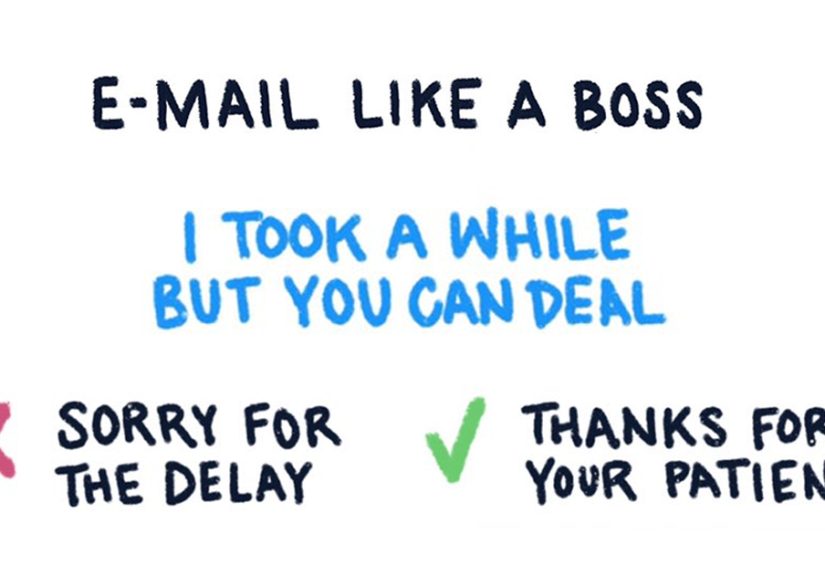
The hack is about framing. When you write, “Sorry for the delay,” you center your mistake. When you write, “Thanks for your patience,” you center their time and cooperation while still acknowledging the delay. When you write, “Just checking in,” you sound tentativelike you’re knocking on the door of your own request. When you write, “When can I expect an update?” you sound clear, direct, and respectfully specific.
Think of it like good design: the best UI doesn’t add more buttons. It removes friction. Your email language can do the same.
Why One Tiny Word Can Shrink Your Authority
Many of us lace emails with “softeners” because we’re trying to be polite. The intention is good. The side effect can be… mushy. Words like just, maybe, possibly, I think, and sorry can signal uncertainty, even when you’re completely correct and simply doing your job.
The goal isn’t to become blunt or rude. It’s to become clear. Clarity is respectful because it saves time and reduces misinterpretation. And in a workplace context, clarity often reads as competence.
There’s also a practical reality: your reader is scanning. Subject lines, first sentences, and concrete asks matter. If your message starts with three sentences of verbal tip-toeing, your request may not register at all. Or worseyour request registers, but your confidence doesn’t.
The Designer’s Swap List: Small Changes, Big Upgrade
Below are “before and after” swaps inspired by the designer’s chart plus modern business writing guidance. Use them as templates, not commandments. Context matters. (Email is a mood ring.)
1) Addressing a Delay
- Instead of: “Sorry for the delay.”
- Try: “Thanks for your patience.”
Why it works: it acknowledges the delay without groveling. If the delay caused real impact, pair gratitude with accountability: “Thanks for your patiencehere’s the updated file and the next step.”
2) Scheduling Without Making Your Calendar a Donation
- Instead of: “What works best for you?”
- Try: “Could you do Tuesday at 2:00 or Wednesday at 10:30?”
Why it works: offering options is considerate and decisive. You reduce back-and-forth and you signal that your time matters too.
3) Responding to Thanks Without Sounding Dismissive
- Instead of: “No worries!” / “No problem!”
- Try: “Happy to help.” / “Glad this was helpful.”
Why it works: “no problem” can be totally fine, but in some formal contexts it can read like you’re brushing the work aside. “Happy to help” stays warm while still sounding polished.
4) Making Recommendations Without Shrinking Them
- Instead of: “I think maybe we should…”
- Try: “It’d be best if we…” / “I recommend we…”
Why it works: you’re not removing humility; you’re removing fog. If you genuinely aren’t sure, say so clearly: “My recommendation is X, but I’d like your input on Y.”
5) When the Email Draft Is Becoming a Novel
- Instead of: (rewriting the email for 40 minutes)
- Try: “It’d be easier to discuss liveare you free for a quick call?”
Why it works: some topics are too nuanced for text. Suggesting a live conversation can prevent misunderstandings and endless reply chains. Bonus: it rescues you from writing “Per my previous email” and becoming a meme.
6) Following Up Without Sounding Like You’re Apologizing for Existing
- Instead of: “Just checking in…”
- Try: “When can I expect an update?” / “Are we on track for Friday?”
Why it works: it’s specific and time-bound. “Checking in” is vague. “On track for Friday” is a clear request for status.
7) Acknowledging a Mistake Like a Professional Adult
- Instead of: “Ahh sorry! My bad. Totally missed that.”
- Try: “Nice catchupdated file attached. Thanks for flagging.”
Why it works: you accept the correction, fix the issue, and appreciate the helpall without spiraling into self-punishment.
8) Stating a Need Without Asking Permission to Be a Person
- Instead of: “Could I possibly leave early?”
- Try: “I will need to leave at 3:30 for an appointment.”
Why it works: it’s calm and direct. If approval is required, you can still keep it professional: “I’ll need to leave at 3:30please confirm that works.”
How to Use the Hack Without Sounding Cold
Some people worry that removing softeners will make them sound aggressive. That’s a fair fearespecially if your workplace culture prizes friendliness. The trick is to keep warmth in the right places:
- Warm greeting (when appropriate): “Hi Jordanhope your week’s going well.”
- Clear purpose early: “I’m emailing to confirm next steps on the launch timeline.”
- One main ask (or numbered asks): “Could you approve the copy by Thursday?”
- Respectful close: “Thanks againappreciate your help.”
You’re not trying to sound “dominant.” You’re trying to sound easy to work with. That means: friendly tone, clear request, reasonable deadline, and a reader-friendly format.
Specific Examples: Before & After Emails
Example A: The Follow-Up That Actually Gets a Reply
Before:
“Hi! Just checking in to see if you maybe had a chance to look at the proposal. Sorry to bother you! If not, no worrieswhenever works.”
After:
“Hi Taylorfollowing up on the proposal I sent Monday. Are you able to share feedback by Thursday afternoon? If you’d like, I can hop on a 10-minute call to walk through the key points. Thanks!”
Notice what changed: fewer fillers, a clear deadline, and an optional path that makes replying easier.
Example B: The Late Reply Without the Emotional Grocery List
Before:
“Sorry for the delaythis week got away from me. I’m so sorry. I feel terrible. Anyway, here’s the file.”
After:
“Thanks for your patienceattached is the updated file. Next step: if you can confirm by 2:00 p.m. tomorrow, I’ll finalize and send the deliverable.”
Example C: Asking for a Meeting Without the Infinite Ping-Pong
Before:
“What works best for you? I’m free whenever. Totally flexible.”
After:
“Could you do Tuesday at 2:00 p.m. or Wednesday at 10:30 a.m.? If neither works, send two times that do and I’ll pick one.”
Example D: Giving Feedback Without Sounding Like a Villain Monologuing
Respectable emails aren’t just confidentthey’re also specific. Instead of “Let me know if you have edits,” try guiding the response.
Try:
- “Do you prefer Option A’s headline or Option B’s layout?”
- “Please review sections 2–3 and confirm the numbers are correct.”
- “If you approve the draft, I’ll submit it by Friday.”
A Quick “Respectable Email” Checklist
Use this when you’re about to hit Send and your brain starts whispering, “What if they think I’m annoying?” (Spoiler: they mostly think about lunch.)
Subject Line
- Specific and useful: “Approval needed: Q2 deck by Thursday”
- Not mysterious: avoid “Quick question” unless you enjoy suspense novels
First Two Lines
- Say why you’re writing
- Include the key detail (deadline, decision, request)
The Ask
- Make it obvious what you need
- Make it easy to respond (yes/no, A/B, or a short list)
Tone
- Remove unnecessary “just,” “maybe,” and “sorry” (keep the necessary ones)
- Add warmth with gratitude and clarity, not with over-apologizing
Close
- Restate the next step if needed
- Sign off appropriately for the relationship
Real-World Experiences: What Happens When You Swap One Phrase (500+ Words)
The first time you try this hack, you may feel like you’re sending a text without emojis. Technically fine, emotionally terrifying. You’ll type “Following up on…” and your fingers will itch to add “just,” like it’s a security blanket. You’ll delete it, stare at the screen, and wonder if you’ve accidentally become rude. Congratulationsyou’re having the most common reaction to writing clearly.
In real workplace situations, the biggest change isn’t that people suddenly bow when you enter the inbox. It’s subtler: your emails get answered faster, your requests don’t get “lost,” and you spend less time writing follow-ups that sound like you’re asking permission to ask. One small shiftlike replacing “Just checking in” with “Are we on track for Friday?”turns a vague nudge into a simple status question. That makes it easier for the recipient to respond with something concrete: “Yes,” “No,” or “We need two more days.” You’ve moved the conversation forward without adding drama.
The “thanks instead of sorry” swap is especially noticeable. People often think apologizing shows humility, and sometimes it does. But when every email begins with “Sorry,” it can create an unintended pattern: you’re always at fault, always behind, always imposing. Switching to “Thanks for your patience” doesn’t erase responsibility; it reframes the moment as collaboration. In day-to-day work, that can reduce the emotional charge in a thread. The email becomes about the task, not your self-esteem.
Another practical experience: scheduling becomes less exhausting. When you stop asking, “What works best for you?” and start offering two options, you’ll often see the thread collapse from six emails to one. It’s not magicit’s mechanics. People can respond quickly when the decision is small. They can’t respond quickly when they have to design the decision from scratch. Offering options also signals you’re organized. Even if your calendar looks like a game of Tetris played by a caffeinated squirrel, your email now reads like you have a plan.
Then there’s the moment you acknowledge a mistake. Many of us default to a mini-confessional: “I’m so sorry, I can’t believe I missed that, that’s on me, please forgive my existence.” But the professional version“Nice catch. Updated file attached. Thanks for flagging.”does something powerful: it fixes the issue and keeps the relationship intact. It also quietly communicates that you’re resilient. You don’t crumble; you correct. In collaborative environments, that’s a trait people trust.
The funniest part is that this hack often changes how you feel as much as how others perceive you. Writing “I recommend” instead of “I think maybe” nudges your brain into a more decisive posture. You start asking better questions. You get more specific about what feedback you want. You stop padding every request with extra exits (“If not, that’s okay!”) that invite people to ignore you. Over time, the cumulative effect is less backtracking and fewer “Sorry to bother you” messages that were never bothersome in the first place.
Of course, real life has nuance. Some cultures and teams value a softer tone, and some situations truly require an apology (missed deadline, broken promise, genuine harm). The hack isn’t “never say sorry.” It’s “don’t say sorry on autopilot.” The best experience-based rule is simple: match the weight of the situation. If you caused damage, own it. If you’re simply doing normal work, write like it’s normal workclear, respectful, and confident.
Conclusion
Sounding respectable in email isn’t about sounding fancy. It’s about sounding clear. The designer’s word phrasing hack works because it removes the language that quietly undercuts youexcessive apologizing, vague nudges, and self-minimizing fillerand replaces it with language that respects everyone’s time.
Start small: delete one “just.” Swap one “sorry” for one “thanks.” Offer two meeting times instead of infinite flexibility. The result isn’t a colder email. It’s a cleaner onemore readable, more actionable, and (bonus) less likely to haunt you at 2:00 a.m. when your brain suddenly remembers you wrote “per my last email” in a moment of weakness.





 Close
Close