
Table of Contents >> Show >> Hide
- Quick Answer: Does TikTok Notify Screenshots or Screen Recordings?
- Does TikTok Notify When You Screenshot a Video?
- Does TikTok Notify When You Screen Record a Video?
- Does TikTok Notify When You Screenshot a Profile?
- Does TikTok Notify When You Screenshot Direct Messages?
- Does TikTok Notify When You Screen Record DMs?
- Does TikTok Notify When You Screenshot Stories?
- Does TikTok Notify When You Screenshot a Live?
- Can TikTok Creators See Who Saved Their Videos?
- Can You Stop People From Screenshotting Your TikToks?
- What TikTok Actually Notifies Users About
- Does TikTok Detect Screenshots on Android or iPhone?
- Can Third-Party Apps Tell You Who Screenshotted Your TikTok?
- Is It Okay to Screenshot TikTok Content?
- Best Alternatives to Screenshotting on TikTok
- Common Myths About TikTok Screenshot Notifications
- Myth 1: TikTok tells creators every time someone screenshots a video.
- Myth 2: TikTok notifies people when you screen record DMs.
- Myth 3: If a creator disables downloads, screenshots are blocked too.
- Myth 4: Profile view history means screenshot tracking is active.
- Myth 5: Third-party apps can show screenshot spies.
- Real-World Experiences: What It Feels Like to Screenshot or Screen Record TikTok
- Conclusion
Let’s answer the question everyone secretly Googles with one eye on their phone: Does TikTok notify when you screen record or screenshot? As of the latest publicly available TikTok behavior, the answer is simple: No, TikTok does not notify users when you take a screenshot or screen record their videos, profiles, comments, Lives, Stories, or direct messages.
That means if you capture a funny comment, save a recipe from a cooking video, screenshot a creator’s profile for later, or screen record a dance tutorial because your feet need three business days to process the choreography, TikTok does not send the creator a “Someone captured your content” alert.
However, “TikTok does not notify” does not mean “everything is private forever.” TikTok has other visibility features, including profile view history, post view history, video analytics, read receipts in direct messages, downloads, shares, and privacy settings. These features can sometimes make users feel like TikTok is watching every thumb movement like a digital hall monitor. So let’s break down what TikTok does and does not reveal.
Quick Answer: Does TikTok Notify Screenshots or Screen Recordings?
No. TikTok currently does not send screenshot or screen recording notifications. If you screenshot a TikTok video, profile, comment section, Story, Live, or direct message, the other person is not notified. If you use your phone’s built-in screen recorder to capture a TikTok video or conversation, TikTok does not send a screen recording alert either.
This is different from apps like Snapchat, where screenshot notifications are part of the culture. TikTok is designed more like a public entertainment and discovery platform, where videos are watched, saved, shared, stitched, duetted, discussed, and occasionally replayed until your algorithm starts acting like it knows your soul.
Does TikTok Notify When You Screenshot a Video?
No, TikTok does not notify creators when you screenshot one of their videos. Whether the video is paused, playing, muted, trending, or buried deep in your For You Page at 1:47 a.m., the creator will not receive a screenshot notification.
Creators can see performance metrics such as views, likes, comments, shares, and sometimes favorites or audience insights depending on account tools. But TikTok does not show a list of people who took screenshots. There is no “screenshots” tab, no secret screenshot counter, and no creator dashboard that says, “Jessica captured your soup dumpling tutorial.”
Example
If you screenshot a video showing a bookshelf setup, outfit idea, gym routine, recipe, travel tip, or funny meme, the creator may see that the video received views and engagement. They will not know you personally took a screenshot.
Does TikTok Notify When You Screen Record a Video?
No, TikTok does not notify users when you screen record a video. You can use iPhone screen recording, Android screen recording, or desktop recording tools, and TikTok does not currently send an alert to the creator.
This applies to most common TikTok content types, including regular videos, photo posts, slideshows, comments, profiles, and Lives. Still, screen recording someone else’s content and reposting it as your own is not a great idea. It may violate copyright rules, creator rights, platform guidelines, or basic internet manners. The internet already has enough chaos; we do not need to add “stolen capybara edits” to the pile.
Does TikTok Notify When You Screenshot a Profile?
No, TikTok does not notify a user when you screenshot their profile. You can capture their bio, profile photo, follower count, pinned videos, link, or general layout without triggering a screenshot notification.
But there is one important detail: profile view history. If both users have profile view history turned on and meet TikTok’s eligibility rules, a person may be able to see that you viewed their profile. That is not the same as a screenshot alert. TikTok may show that you visited the profile, but it does not say whether you screenshotted anything while you were there.
Profile View History vs. Screenshot Notifications
Think of profile view history like walking past someone’s front porch and waving awkwardly. A screenshot notification would be like leaving a note that says, “I photographed your porch swing.” TikTok may reveal the visit in some cases, but it does not reveal the screenshot.
Does TikTok Notify When You Screenshot Direct Messages?
No, TikTok does not currently notify people when you screenshot direct messages. If someone sends you a message, link, video, or conversation in TikTok DMs, taking a screenshot does not trigger a notification to the other person.
That said, screenshots of private conversations can create real problems if shared without permission. Just because TikTok does not notify someone does not mean the screenshot is harmless. Private messages may include names, faces, usernames, personal details, jokes taken out of context, or sensitive information. Share carefully, or better yet, do not share private DMs unless there is a clear reason, such as reporting harassment or documenting a safety concern.
Does TikTok Notify When You Screen Record DMs?
No, TikTok does not send a notification when you screen record direct messages. However, TikTok does include message-related features such as read status, activity status, message permissions, reporting tools, and blocking options. So while screen recording itself is not announced, your general activity in messages may still be visible in other ways depending on settings.
For example, someone may know you opened a message if read status is enabled, but they will not receive a separate alert saying you recorded the chat. Big difference. One says “seen.” The other would say “recorded.” TikTok currently does not do the second one.
Does TikTok Notify When You Screenshot Stories?
No, TikTok does not notify users when you screenshot their Stories. TikTok Stories are temporary posts, but temporary does not mean screenshot-proof. If someone posts a Story and another person captures it, TikTok does not send a Snapchat-style notification.
This is important because many users assume disappearing content is automatically more private. It is not. A Story can vanish from TikTok after its time limit, but a screenshot or screen recording can live on someone’s camera roll. That camera roll may be organized, chaotic, or 42,000 photos deep, but the point stands: temporary content can still be captured.
Does TikTok Notify When You Screenshot a Live?
No, TikTok does not notify a host when someone screenshots or screen records a TikTok Live. If you capture a moment from a Live stream, TikTok does not send an alert to the creator or other viewers.
However, Lives can involve real-time people, locations, comments, purchases, personal opinions, or accidental oversharing. If you record a Live, use common sense. Saving a product demo for later is one thing. Uploading embarrassing clips to mock someone is another thing entirely, and it can cross community guideline, privacy, or harassment lines.
Can TikTok Creators See Who Saved Their Videos?
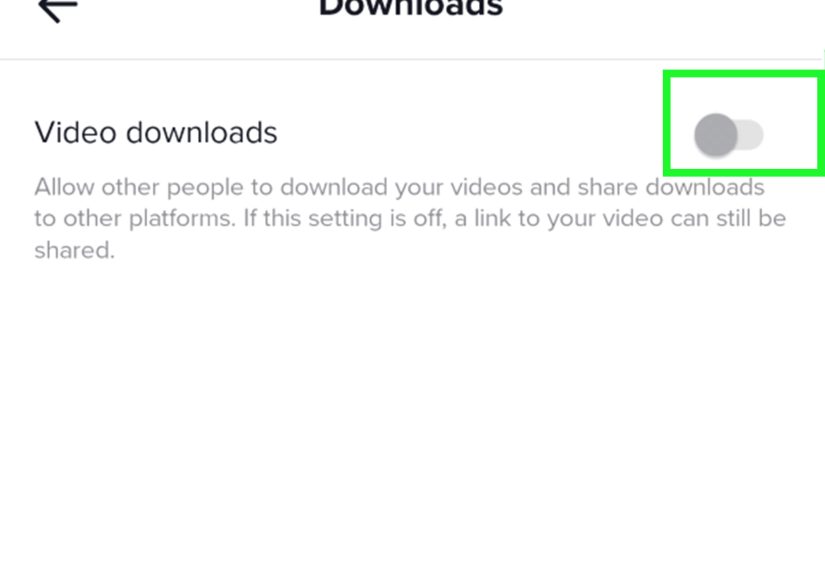
TikTok creators may see engagement data, but they generally cannot see every individual who saved, screenshotted, or screen recorded their content. TikTok’s built-in download feature is different from taking a screenshot. If a creator allows downloads, viewers may tap “Save video” or “Save photo.” If the creator disables downloads, the built-in save option may disappear, but that does not block screenshots or external screen recordings.
In plain English: disabling downloads makes it harder for people to save the clean official file. It does not build a magic force field around the screen. If the content is visible on someone’s device, that person may still be able to capture it using device-level tools.
Can You Stop People From Screenshotting Your TikToks?
You cannot fully stop screenshots or screen recordings on TikTok. But you can reduce unwanted exposure by managing privacy settings and thinking carefully before posting.
Useful Privacy Steps
- Make your account private: This limits your content to approved followers.
- Adjust post visibility: Set certain videos to friends, followers, or only you when available.
- Disable downloads: This prevents viewers from using TikTok’s official save button on eligible content.
- Limit comments, Duets, and Stitches: These settings help control how people interact with your posts.
- Remove followers you do not trust: A private account only helps if your follower list is not a guest list for chaos.
- Avoid posting sensitive content: If you would panic seeing it in someone else’s camera roll, do not post it publicly.
These settings help, but none of them guarantee that viewers cannot capture what appears on their screens.
What TikTok Actually Notifies Users About
TikTok may notify users about common social interactions, but not screenshots. Depending on settings, a user may receive alerts for likes, comments, follows, mentions, tags, reposts, messages, favorites, and other platform activity. TikTok may also show certain view-related information through profile view history or post view history if those features are enabled and available.
This is where confusion happens. Someone might think, “TikTok told me they viewed my profile, so TikTok must also tell me they screenshotted it.” Not true. Viewing and capturing are separate actions. TikTok may reveal some viewing behavior in specific features, but it does not currently reveal screenshot or screen recording behavior.
Does TikTok Detect Screenshots on Android or iPhone?
Modern phones can sometimes let apps know that a screenshot happened, especially on newer Android versions with screenshot detection tools. You may even see a system message on some devices saying an app detected a screenshot. That does not automatically mean TikTok sent a notification to another user.
The practical answer for TikTok users remains: TikTok does not currently notify creators or message senders when you screenshot or screen record their content. Device-level detection and user-facing social notifications are not the same thing. One is a technical event on your phone. The other is an app choosing to tell another person. TikTok is not currently known for sending those screenshot alerts.
Can Third-Party Apps Tell You Who Screenshotted Your TikTok?
Be very careful with apps or websites claiming they can show who screenshotted your TikTok. These tools are usually unreliable, misleading, or risky. Many ask users to log in, connect accounts, install extensions, or hand over permissions that are not necessary. That is a flashing red sign with a marching band behind it.
TikTok does not provide a normal public feature that shows who screenshotted your videos. If a random tool claims it can unlock that secret list, treat it with suspicion. Protect your login details, avoid unknown APKs or browser extensions, and do not give third-party tools access to your TikTok account unless you fully trust them.
Is It Okay to Screenshot TikTok Content?
In many ordinary cases, screenshots are harmless. People screenshot TikToks to remember recipes, save outfit inspiration, keep a quote, document a bug, compare product recommendations, or send a funny moment to a friend. That is normal internet behavior.
The ethical line appears when screenshots are used to embarrass, harass, impersonate, expose private information, steal creative work, or repost someone’s content without credit. A screenshot is small, but the consequences can be large. Use the same rule you would want others to use with your content: capture responsibly, share thoughtfully, and do not turn someone else’s moment into your engagement farm.
Best Alternatives to Screenshotting on TikTok
Before taking a screenshot, consider using TikTok’s built-in tools. They often keep things cleaner and easier to find later.
- Favorite the video: Best for saving content privately in your TikTok account.
- Use collections: Organize saved videos into categories like recipes, travel, fitness, study tips, or “Things I Swear I’ll Try Someday.”
- Share the link: Send the original video instead of a low-quality screenshot.
- Download when allowed: Use TikTok’s official save option if the creator permits it.
- Follow the creator: Useful if you want more of the same content later.
These methods respect creators better and make it easier to find the original post again. Screenshots are quick, but saved posts are searchable, organized, and less likely to disappear into the black hole known as “Recents.”
Common Myths About TikTok Screenshot Notifications
Myth 1: TikTok tells creators every time someone screenshots a video.
False. TikTok does not currently send screenshot alerts for videos.
Myth 2: TikTok notifies people when you screen record DMs.
False. TikTok does not currently notify users when direct messages are screen recorded.
Myth 3: If a creator disables downloads, screenshots are blocked too.
False. Disabling downloads removes TikTok’s official save option, but it does not prevent device screenshots or screen recordings.
Myth 4: Profile view history means screenshot tracking is active.
False. Profile view history may show visits under certain conditions, but it does not reveal screenshots.
Myth 5: Third-party apps can show screenshot spies.
Highly unlikely and unsafe. Be cautious with any service that claims to reveal hidden screenshot activity.
Real-World Experiences: What It Feels Like to Screenshot or Screen Record TikTok
Most TikTok users have had that tiny moment of panic after taking a screenshot. You capture a recipe, a skincare routine, a funny comment, or someone’s oddly specific “three signs your cat is judging you” video, and then your brain whispers, “Wait. Did they get notified?” Suddenly, your casual screenshot feels like a spy movie, except the mission is saving a pasta sauce recipe.
In everyday use, the experience is usually uneventful. You take the screenshot, the image lands in your camera roll, and nothing dramatic happens. No alert pops up saying the creator has been informed. No message appears in the chat. No siren plays. TikTok continues feeding you videos as if nothing happened, because from the user’s perspective, nothing visible did happen.
Screen recording feels similar. Many people screen record TikToks when they want to save a tutorial that moves too fast. A dance video might need replaying in slow motion. A language-learning tip might include pronunciation worth reviewing. A DIY repair clip might show a tool angle that disappears before your brain has time to clock in. In those situations, recording the screen is often a personal learning shortcut.
The awkward part comes when the content involves another person’s privacy. Screenshotting a public recipe is not the same as recording a private message. Saving a makeup technique is not the same as capturing someone’s emotional Live moment and posting it elsewhere. The app may not notify them, but your own judgment still matters. Technology gives you the ability; ethics decides whether you should use it.
Creators experience the other side of this uncertainty. Many wonder whether viewers are saving their posts without permission. The honest answer is that some probably are. That is why creators often add watermarks, keep original files, use captions with their username, limit downloads, or post sensitive content only to smaller audiences. It is not paranoia; it is basic digital self-defense with a ring light.
For brands and marketers, screenshots are common research tools. Teams capture competitor profiles, ad examples, product comments, influencer media kits, and trend references. Since TikTok does not send screenshot alerts, this kind of research happens quietly. Still, responsible teams should use screenshots for analysis, not plagiarism. Inspiration is fine. Copy-pasting another creator’s whole personality is not a strategy; it is a cry for a brainstorming meeting.
For regular users, the safest habit is simple: screenshot things you need for personal reference, avoid exposing private people, and use TikTok’s built-in save or favorite tools when possible. If you are capturing a DM because someone is harassing you, keep the evidence and report the behavior. If you are capturing a public video because it made you laugh, credit the creator when sharing. Small choices make the internet less weird, which is a noble goal considering the internet is already wearing mismatched socks.
The biggest lesson from real user experience is this: TikTok does not currently notify screenshots or screen recordings, but screenshots are still powerful. They can preserve helpful ideas, protect evidence, spread jokes, or cause harm depending on how they are used. So yes, you can capture TikTok content without triggering an alert. Just do it with the same respect you would want if someone were capturing yours.
Conclusion
So, does TikTok notify when you screen record or screenshot? No. TikTok does not currently notify users when you screenshot or screen record videos, profiles, comments, Lives, Stories, or direct messages. Creators may see views, comments, likes, shares, and other engagement data, but they do not receive screenshot alerts.
The important catch is that TikTok has other visibility tools, such as profile view history, post view history, read status, and analytics. These can reveal certain interactions, but they are not screenshot notifications. If privacy matters to you, use private account settings, limit downloads, manage DMs, and think twice before posting anything sensitive. If you are capturing someone else’s content, use it responsibly and avoid sharing private or copyrighted material without permission.
Note: TikTok features and privacy tools can change over time. This article reflects currently observed TikTok behavior and publicly available TikTok privacy features as of May 2026. Before publishing or relying on this information for policy-sensitive content, review TikTok’s current Help Center and in-app settings for the latest updates.





 Close
Close