
Table of Contents >> Show >> Hide
- Quick Answer: What Is the Fastest Way to Add a Second Email in Yahoo Mail?
- Understand Your Three “Second Email” Options in Yahoo Mail
- How to Add a Second Yahoo Account in Yahoo Mail on Desktop
- How to Add Another Email Provider in Yahoo Mail on Desktop
- How to Add a Second Email in the Yahoo Mail App on Mobile
- How to Add a Second Email in Yahoo Mail Using Mobile Web
- How to Create a Second Yahoo Address Without a New Inbox
- Yahoo Mail on iPhone and Android: Native App Alternatives
- Common Problems When Adding a Second Email in Yahoo Mail
- Best Practices for Managing Multiple Email Accounts in Yahoo Mail
- Which Setup Should You Choose?
- Real-World Experiences With Adding a Second Email in Yahoo Mail
- Final Thoughts
Managing one email account is fine. Managing two can feel like juggling flaming bowling pins while your phone buzzes nonstop. The good news? Yahoo Mail makes it pretty easy to add a second email on desktop and mobile, whether that second address is another Yahoo account, a Gmail inbox, an Outlook mailbox, or a spare address you use to dodge newsletters that breed like rabbits.
If you have been searching for how to add a second email in Yahoo Mail, this guide walks you through the real options, the exact steps, the common mistakes, and the smartest setup for your daily routine. You will also learn the difference between adding another Yahoo account, linking a third-party mailbox, and creating a temporary Yahoo address. Those sound similar, but they are not the same thing, and knowing the difference saves a lot of head-scratching later.
Note: In Yahoo Mail, “add a second email” can mean three different things: adding another Yahoo account you can switch between, linking a non-Yahoo mailbox such as Gmail or Outlook, or creating a temporary Yahoo sending address. This guide covers all three so you can pick the setup that actually matches your goal.
Quick Answer: What Is the Fastest Way to Add a Second Email in Yahoo Mail?
On desktop, sign in to Yahoo Mail and either use your profile image to add another Yahoo account or go to Settings > Mailboxes to add another mailbox such as Gmail, Outlook, or AOL. On the Yahoo Mail app, tap your Profile icon, then choose either Manage Accounts to add another Yahoo account or Add another mailbox to connect a different provider.
That is the short version. The more useful version is below, because the best method depends on whether you want two full inboxes, one unified inbox, or one disposable-style address for signups and spam magnets.
Understand Your Three “Second Email” Options in Yahoo Mail
1. Add a second Yahoo account
This is best if you already have two separate Yahoo addresses, such as one for work and one for personal use. Yahoo lets you switch between accounts without signing out each time, which is a beautiful little gift to anyone who has ever typed the wrong password three times before coffee.
2. Link another mailbox to Yahoo Mail
This option is ideal if your second address is from another provider, such as Gmail, Outlook, or AOL. When linked correctly, Yahoo Mail can become your central email hub, letting you view and send messages from multiple accounts in one place.
3. Create a temporary Yahoo address
This works differently. A temporary Yahoo address is not a separate inbox. Instead, it routes messages into your main Yahoo mailbox while giving you a different address to hand out. It is useful for newsletters, online shopping, limited-time registrations, or any website that feels a little too interested in your long-term relationship.
How to Add a Second Yahoo Account in Yahoo Mail on Desktop
If your goal is to switch between two Yahoo accounts in the browser, this is the cleanest method.
- Open Yahoo Mail and sign in to your main account.
- Click or hover over your profile image in the upper area of the page.
- Select Add or Manage accounts.
- Click Add account.
- Sign in with your second Yahoo email address and password.
- Once added, switch between accounts from the account list.
This setup is excellent for people who keep separate Yahoo identities, such as a family account and a freelance account. Yahoo account switching on desktop is simple because it keeps the accounts attached to the same sign-in environment, so you do not have to log out and back in every time you want to jump from one inbox to another.
Example: Let’s say you use [email protected] for friends and [email protected] for online orders and receipts. Adding both accounts on desktop lets you flip back and forth quickly instead of searching your browser history like a detective in a very low-budget mystery show.
How to Add Another Email Provider in Yahoo Mail on Desktop
If your second email address is not Yahoo, use the mailbox-linking feature instead. This is the best answer for people who want a unified inbox in Yahoo Mail.
- Sign in to Yahoo Mail on your desktop browser.
- Open Settings.
- Click Mailboxes.
- Under the mailbox list, click Add mailbox.
- Select your email provider, such as Gmail, Outlook, or AOL.
- Enter the email address and continue.
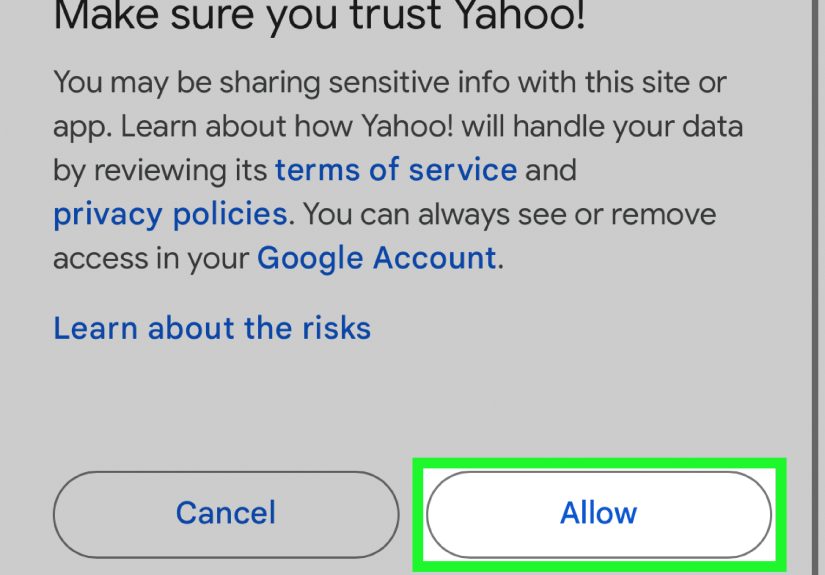
- Complete the authentication window and approve access.
- Save your changes.
Depending on the Yahoo Mail version you are using, the wording may look slightly different. In some layouts you may see More Settings before Mailboxes. Same idea, same mission, same destination.
Once linked, you can often send and receive email from that connected account within Yahoo Mail, making it a practical all-in-one workspace for users who do not want to hop among tabs all day.
When desktop linking is the right move
- You use Yahoo for personal email but also need your Gmail inbox in the same place.
- You want fewer app and browser switches during the day.
- You prefer one dashboard for reading, replying, and basic message management.
How to Add a Second Email in the Yahoo Mail App on Mobile
The Yahoo Mail app is usually the easiest mobile option because it is designed to handle more than one account. The steps are slightly different depending on whether you are adding another Yahoo account or linking a mailbox from another provider.
Add another Yahoo account in the Yahoo Mail app
- Open the Yahoo Mail app.
- Tap the Profile icon.
- Tap Manage Accounts.
- Tap Add Account.
- Enter your Yahoo email address and password.
After that, the extra Yahoo account should appear in your account list, making it easy to switch whenever needed.
Link Gmail, Outlook, or another provider in the Yahoo Mail app
- Open the Yahoo Mail app.
- Tap the Profile icon.
- Tap Add another mailbox.
- Select the email provider.
- Approve access if prompted.
- Enter your login details and follow the on-screen instructions.
This is a strong setup for people who live on their phones and want one app to handle multiple inboxes. It also keeps things tidier if your work, shopping, and personal messages are spread across more than one provider.
How to Add a Second Email in Yahoo Mail Using Mobile Web
Not everyone loves installing another app. If you use Yahoo Mail in a mobile browser, you can still add another mailbox.
- Open Yahoo Mail in your mobile browser.
- Tap the Menu icon.
- Tap Settings.
- Tap Manage Accounts.
- Tap Add Mailbox.
- Select the provider and complete sign-in.
This method is handy if you are on a shared device, testing an account setup, or simply allergic to installing one more app that wants notifications, battery, storage, and maybe your firstborn.
How to Create a Second Yahoo Address Without a New Inbox
Sometimes you do not need a whole second mailbox. You just need a second email address. That is where Yahoo’s temporary email addresses can help.
In supported Yahoo Mail Plus locales, you may be able to create temporary addresses under your main account. These addresses send incoming mail to your main inbox while giving you another address to share publicly. This is a nice option for coupon sites, test signups, event registrations, or any situation where you do not fully trust the sender to behave like a decent internet citizen.
How it works
- You create a nickname and additional temporary addresses under your main Yahoo account.
- Messages sent to those addresses still arrive in your main inbox.
- You can often choose that temporary address when composing messages.
- Availability depends on region and account type, so some users may not see the feature.
If your account does not show the temporary address option, do not panic. It does not necessarily mean you clicked the wrong button. It may simply not be available for your locale or subscription status.
Yahoo Mail on iPhone and Android: Native App Alternatives
If you do not want to use the Yahoo Mail app, your phone’s built-in mail tools can also help you manage multiple accounts.
On iPhone or iPad
You can add a Yahoo account in Apple Mail through the device settings. This is convenient if you prefer one place for all accounts on iOS. Apple Mail can automatically set up common providers like Yahoo, and you can add more than one account to the Mail app.
On Android
You can add Yahoo in other mail apps too, including Gmail on Android. This is useful if you already live inside the Gmail app and just want Yahoo to join the party instead of making you attend a separate one.
The tradeoff is simple: native apps are great for unified mail handling, but the Yahoo Mail app usually offers a more Yahoo-specific experience, including certain settings, customizations, and account controls.
Common Problems When Adding a Second Email in Yahoo Mail
You are adding the wrong kind of account
This is the biggest source of confusion. If you already have two Yahoo addresses, add another Yahoo account. If your second address is Gmail or Outlook, use Add mailbox or Add another mailbox. If you just want a mask address, look for temporary email addresses.
You get stuck on verification
Yahoo may ask you to verify your account when the sign-in looks unusual. Make sure your recovery phone number and recovery email are current. Outdated recovery information is the digital version of locking your keys in the car and then realizing the spare key is also in the car.
A linked account fails to connect
If authentication fails, remove the connection and try again. On mobile, Yahoo specifically advises deleting and re-adding a mailbox if the saved server details are wrong or cannot be edited. Also make sure you are choosing the correct provider and approving any permission prompts fully.
Your third-party app asks for an app password
If you use Yahoo two-step verification with a third-party mail app, you may need an app-specific password. This does not usually apply to the official Yahoo Mail app, but it can matter in outside apps and clients.
Best Practices for Managing Multiple Email Accounts in Yahoo Mail
- Label by purpose: keep one account for personal conversations, another for shopping and subscriptions, and another for work or side projects.
- Review send-from settings: before you hit Send, make sure the correct address is selected. Accidentally replying to your boss from your coupon account is not a strong branding strategy.
- Secure every account: add recovery methods and turn on two-step verification where possible.
- Remove old connections: if you stop using an account, disconnect it so your mailbox list stays clean.
- Test the setup: send yourself a message from the new account and reply back to confirm everything works properly.
Which Setup Should You Choose?
Here is the simplest way to decide:
| Goal | Best Yahoo Mail Option |
|---|---|
| You have two Yahoo addresses | Add another Yahoo account and switch between them |
| You use Yahoo plus Gmail or Outlook | Link another mailbox inside Yahoo Mail |
| You want a second address without another inbox | Create a temporary Yahoo address if available |
| You want all accounts in your phone’s default mail app | Use Apple Mail or another mobile mail client |
Real-World Experiences With Adding a Second Email in Yahoo Mail
In real life, most people add a second email in Yahoo Mail for one of three reasons: work-life separation, spam control, or convenience. And honestly, all three are pretty relatable. Nobody wakes up thinking, “Today I would love my dentist reminders, payroll messages, marketing emails, and my aunt’s ten-photo chain email to share the same exact inbox.”
A common experience on desktop is that users expect “Add account” and “Add mailbox” to mean the same thing. They do not. Someone with two Yahoo addresses usually gets the smoothest experience by adding both Yahoo accounts and switching between them. But someone with Yahoo plus Gmail may do that first, then wonder why the Gmail option never appears in the switcher. That is because Gmail needs to be linked as a mailbox, not added as another Yahoo account. Once people understand that difference, setup suddenly feels a lot less mysterious.
On mobile, the Yahoo Mail app tends to be the easiest route for users who want everything in one app. Many people like being able to open the app, tap the profile icon, and bounce between accounts quickly. It is especially useful for anyone who travels, freelances, manages a family inbox, or shops online under a separate address. The convenience factor is huge. Instead of signing in and out repeatedly, users can keep multiple accounts ready to go.
That said, some users still prefer native apps like Apple Mail or Gmail on Android because they already use those tools for other accounts. Their experience is usually centered around simplicity: one app, one notification style, one routine. The downside is that they may miss some Yahoo-specific controls or features. So the best experience often depends less on the provider and more on your habits. If Yahoo is your email home base, using Yahoo Mail itself usually makes the most sense. If your phone is your true home base, the built-in app may win.
Another real-world pattern is people creating a second address for online shopping, newsletters, trial signups, and account registrations. This can make your main inbox dramatically calmer. It also makes cleanup easier when a brand decides that buying one pair of socks means you obviously want four emails a day until the end of time. Users who have access to temporary Yahoo addresses often find them handy for exactly this reason, because they get an extra address without fully managing another separate inbox.
Security also shows up in real experiences more than people expect. Users often discover old recovery emails, forgotten phone numbers, or verification prompts right when they try to add a second account on a new device. It is annoying in the moment, but it is also a useful reminder: multiple accounts only stay convenient when they stay secure. The smoothest long-term experience usually comes from a simple combination of smart separation, accurate recovery info, and a quick test message after setup. Do that, and Yahoo Mail becomes much easier to manage, even with more than one address in the mix.
Final Thoughts
If you want to know how to add a second email in Yahoo Mail on desktop and mobile, the most important step is choosing the right method. Add another Yahoo account if you already have two Yahoo addresses. Link a mailbox if your second email is Gmail, Outlook, or AOL. Use a temporary Yahoo address if you only need another address, not another inbox.
Once you match the right tool to the right goal, Yahoo Mail becomes a much more organized place to work. Fewer missed messages, less inbox chaos, and a lower chance of sending personal replies from the wrong address. That alone is worth the setup.







 Close
Close