
Table of Contents >> Show >> Hide
- What “airtime balance” actually means now
- The fastest ways to check your phone’s airtime balance
- Quick carrier guide: balance-check methods at a glance
- How to check your balance by carrier
- How to check data usage on iPhone and Android
- What to do if your airtime balance looks wrong
- Common mistakes people make when checking phone balance
- Real-world experiences people have when checking airtime balance
- Final takeaway
- SEO Tags
If you have ever stared at your phone and wondered, “Do I still have enough airtime, data, or prepaid credit to survive this day?” welcome to the club. Checking your phone’s airtime balance should be simple, but carriers sometimes make it feel like a scavenger hunt with bonus passwords. The good news: once you know where to look, it usually takes less than a minute.
This guide explains how to check your phone’s airtime balance across major U.S. carriers and popular prepaid brands, including Verizon, AT&T, T-Mobile, Cricket, Metro, TracFone, Straight Talk, Mint Mobile, Consumer Cellular, and Google Fi. You will also learn when your phone’s built-in settings help, when they do not, and what to do if the numbers look weird.
Whether you are managing a prepaid line, watching your mobile data like a hawk, or simply trying not to get ambushed by a low-balance surprise, this article walks you through the fastest methods with zero fluff and only a tiny amount of carrier drama.
What “airtime balance” actually means now
Years ago, airtime balance usually meant prepaid minutes. Today, the term is broader. Depending on your carrier, it can refer to your remaining prepaid credit, your talk and text balance, your high-speed data usage, your service end date, or the amount due on your account. In other words, the phrase stuck around even though the billing systems got a lot fancier.
That is why two people can say “check my balance” and mean completely different things. A prepaid user may want to know how much refill credit is left. A postpaid user may really want to see current usage, data consumption, or the next bill. If your carrier app shows a due date instead of a dollar balance, that is not a bug. It is just the modern wireless industry being charmingly inconsistent.
So before you check your phone’s balance, decide what you need to know: prepaid funds, data usage, minute usage, service expiration date, or bill amount. That one tiny step saves a lot of frustrated tapping.
The fastest ways to check your phone’s airtime balance
1. Use your carrier’s app or website
This is usually the best option. Carrier apps tend to show the most complete picture: current balance, due date, auto-pay status, line usage, and plan details. If you are on a family plan or a newer unlimited plan, the app is often the only place where everything makes sense in one screen.
It is also the least likely method to fail. Short codes can vary, old forum posts can become outdated, and automated menus sometimes bury the information under seven layers of robotic small talk. But the official app? That is usually where the truth lives.
2. Use a short code or text command
If you want speed, short codes are your best friend. On many prepaid carriers, dialing a code or texting a keyword returns your balance in seconds. This method is ideal when your app is not loading, your account password has evaporated from memory, or you are using a basic phone that treats apps like a suspicious new trend.
3. Call customer service or the automated system
This is the backup plan when all else fails. It is not glamorous, but it works. Many carriers let you call 611 from your device or use a toll-free number from any phone. If you cannot log in, cannot receive texts, or think your balance is wrong, the phone menu is still a solid option.
4. Check your phone’s built-in data tracker
Your iPhone or Android phone can show mobile data usage, which is handy when you are trying to figure out why your data vanished faster than leftover pizza. Just remember: your phone’s settings show an estimate based on the device, while your carrier tracks usage according to its own billing system. If the numbers do not match exactly, that is normal.
Quick carrier guide: balance-check methods at a glance
| Carrier | Fastest Method | Other Options | What You’ll Usually See |
|---|---|---|---|
| Verizon Prepaid | Dial #BAL or #225 | My Verizon app, automated phone support | Account balance and expiration date |
| AT&T Prepaid | Dial *777# | myAT&T, 611, customer support | Account balance, data balance, package info |
| T-Mobile Prepaid | Dial #999# | #WEB#, #BAL#, online prepaid account | Balance, service cycle, data and expiration details |
| Cricket Wireless | myCricket or online account | Quick Pay, 611 | Amount due, due date, payment details |
| Metro by T-Mobile | myMetro app | Account dashboard and usage history | Line usage, account details, billing info |
| TracFone | Text BALANCE to 611611 | My Account app, chatbot | Current balance and service information |
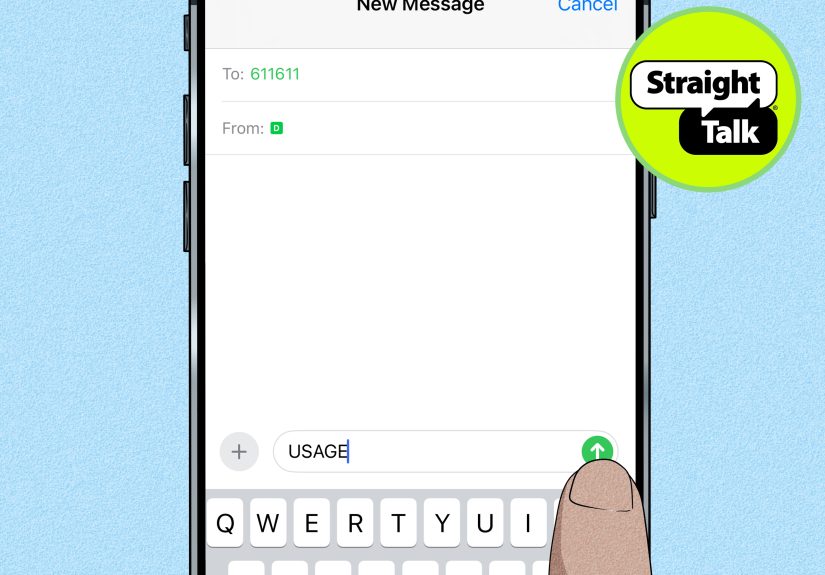
| Straight Talk | Text BALANCE to 611611 | Text SERVICE END DATE, app, website | Balance and service end date |
| Mint Mobile | Text BALANCE to 6700 | Mint app, online account, 611 | Account balance and plan information |
| Consumer Cellular | My CC app or online account | Support assistance | Usage and data balance |
| Google Fi | Google Fi app | Website billing and usage pages | Data usage, billing, line details |
| iPhone | Settings > Cellular | App-by-app usage view | Estimated mobile data use |
| Android / Pixel | Settings > Network & internet > SIMs | Data warning and limit tools | Estimated total and per-app data use |
How to check your balance by carrier
Verizon Prepaid
If you use Verizon Prepaid, the old-school speedy option is still one of the best: dial #BAL or #225 from your prepaid phone. You can also open the My Verizon app and look under payment or prepaid account management. If you prefer a voice menu, Verizon also offers a dedicated prepaid support number.
This is a great example of why prepaid users should know at least one shortcut. If your data is down or your app refuses to cooperate, dialing a code is often the quickest route to the answer.
AT&T Prepaid
AT&T Prepaid users can dial *777# to receive a text with their account balance, data balance, and other package details. You can also manage the line through your online AT&T Prepaid account or call 611 from the device for help. It is one of the more straightforward systems, which feels almost suspiciously generous.
If you are tracking usage over time, AT&T’s online tools are more useful than the quick code because they give a fuller view of what happened during the billing cycle.
T-Mobile Prepaid
T-Mobile Prepaid gives you a neat little toolbox of short codes. #999# checks your account balance, #BAL# shows the service cycle, and #WEB# or #932# checks data used, plan details, and expiration information. If short codes are not your thing, the prepaid account portal works just fine.
This is one of the best setups for people who like quick answers. It is basically the wireless version of having multiple shortcuts on your desktop, except less dusty.
Cricket Wireless and Metro by T-Mobile
Cricket leans more heavily on its online account tools and app. When you sign in, you can see your current amount due, due date, and payment options. Quick Pay can also help if you just need the essentials. Metro by T-Mobile similarly favors the myMetro app, where you can review usage history and account activity.
These carriers are a good reminder that “balance” may look more like a billing snapshot than a classic prepaid airtime meter. If you expected a number that says “minutes left,” you may instead see line usage, renewal details, or amount due.
TracFone and Straight Talk
If you are on TracFone, text BALANCE to 611611. Straight Talk users can do the same, and many plans also support checking the Service End Date by text. This is perfect for prepaid users who want quick answers without signing into anything.
For many budget carriers and brands under the same larger umbrella, text-based self-service is the secret weapon. It is fast, lightweight, and works on devices that are not exactly trying to win smartphone beauty contests.
Mint Mobile, Consumer Cellular, and Google Fi
Mint Mobile makes it easy through the app or online dashboard, but it also supports a convenient text command: BALANCE to 6700. Consumer Cellular is more app-and-portal focused, letting users check usage and data balance through the online account or the My CC app. Google Fi also centers balance and usage inside the Google Fi app, where you can review data usage and line activity.
If your carrier markets itself as streamlined, digital-first, or delightfully app-based, odds are high that the official app is the place to start.
How to check data usage on iPhone and Android
If you do not need your exact carrier balance and only want to know whether your mobile data has been doing backflips in the background, your phone’s settings can help.
On iPhone
Go to Settings > Cellular. There you can see total cellular data usage, per-app data use, and system services. This is especially useful for spotting the real culprit behind your missing data. Spoiler: it is often video apps, cloud backups, or one social media app that swears it was “just refreshing.”
On Android or Pixel
Open Settings > Network & internet > SIMs or your device’s equivalent path. You can see your total data use, tap into app-level details, and even set a warning or hard limit. That is helpful if your plan is tight and you want your phone to wave a giant caution flag before you burn through the month’s allowance.
The catch? Device counters are estimates. Your carrier’s app or billing system is usually the final authority, especially if you are on a plan with unusual billing dates, throttled data, roaming charges, or multiple lines.
What to do if your airtime balance looks wrong
If the number on your screen makes no sense, do not panic and do not immediately blame gremlins. Try these common fixes first:
- Refresh the app or sign out and back in. Some balances lag behind recent payments.
- Check the billing cycle date. Your phone may be showing usage for a different period than your carrier.
- Look for multi-line confusion. Family plans can make one line look like the entire account.
- Check for dual-SIM settings. On iPhone and Android, you may be viewing the wrong line’s usage.
- Review add-ons and passes. Extra data packs, international buckets, and hotspot usage can change what “remaining balance” means.
- Call support if your payment posted but the balance did not update. That is when you stop troubleshooting and let the carrier earn its paycheck.
Common mistakes people make when checking phone balance
The biggest mistake is mixing up airtime balance with data usage. They are related, but they are not always the same thing. Another common mistake is relying on an old short code from a random internet post written when flip phones ruled the earth. Carrier tools change, apps get redesigned, and support pages move around.
People also forget that phones and carriers measure data differently. Your device may say one number, while the carrier says another because the billing cycle starts on a different day or counts traffic in a different way. That is annoying, yes, but it is also normal.
Finally, many users never install the official carrier app. That is like owning a flashlight and choosing to feel your way through a dark garage anyway. You can do it, but why?
Real-world experiences people have when checking airtime balance
One of the most common experiences is the classic prepaid panic: you are about to make an important call, your phone suddenly acts stingy, and now you are speed-checking your balance like you are defusing a tiny wireless bomb. In those moments, short codes are lifesavers. Users on prepaid plans often remember the code faster than they remember a friend’s birthday, which says a lot about modern priorities.
Another familiar scenario happens on unlimited plans. Someone assumes “unlimited” means infinite everything, then discovers that high-speed data is very much a limited guest at the party. So they open their carrier app, see a usage graph, and realize the culprit was a week of hotspot use, streaming during a road trip, or a child who believed downloading an entire universe of videos was a basic human right. The experience is not exactly joyful, but it is educational.
Then there is the dual-SIM confusion, which deserves its own sitcom episode. A user checks data on their iPhone or Android device, sees a low number, feels relieved, and then notices they were looking at the wrong line the whole time. Suddenly the mystery is solved and the mood is ruined. People using travel eSIMs, work lines, or secondary numbers run into this more often than they expect, and it is one of the best reasons to double-check which SIM is selected before trusting the screen.
Budget carrier users often have a different kind of experience: they discover that text-based self-service is weirdly excellent. There is something satisfying about texting a word like BALANCE to a short number and getting an instant answer back. No login, no password reset, no app update, no spinning loading circle trying to test your patience. It feels almost magical, like the carrier accidentally did something convenient.
Older adults and less tech-focused users often prefer calling 611 because it feels familiar. That makes sense. Not everyone wants to hunt through menus in an app they barely use. For many people, especially those who just want a simple answer about talk, text, or due date, hearing the information read aloud is easier than decoding account screens full of tabs, charts, and marketing banners pretending to be helpful.
Some users also learn the hard way that their phone’s built-in data counter is useful, but not always identical to the carrier’s official number. This usually shows up near the end of a billing cycle when someone thinks they have plenty of room left, only to discover the carrier disagrees with great confidence. It is frustrating, but once people understand that device data tracking is an estimate and carrier systems are the final scorekeeper, the confusion drops fast.
And of course there is the universal experience of forgetting account passwords at the exact worst moment. Nothing inspires a sudden, passionate desire to remember login credentials like needing to check your phone balance right now. That is why savvy users keep two methods handy: the app for details and a quick code or text command for emergencies. It is the wireless version of having both a front door key and a spare under the mat, only hopefully more secure than that.
Final takeaway
If you want the easiest rule of thumb, here it is: start with your carrier’s official app, keep one backup shortcut in your memory, and use your phone’s built-in data tracker only as a supporting actor, not the lead. For prepaid users, balance codes and text commands are still the fastest option. For postpaid users, the account app usually gives the clearest picture of usage, due dates, and plan status.
Once you know your carrier’s preferred method, checking your phone’s airtime balance stops feeling like detective work and starts feeling like a 20-second routine. Which is exactly how it should be.
Note: Carrier menus, apps, and short codes can change over time. If a code stops working, check your carrier’s current app or support center first.





 Close
Close