
Table of Contents >> Show >> Hide
- What Does “Full Self-Driving Capability” Mean?
- The Fastest Way to Check If a Tesla Has FSD
- Check the “Additional Vehicle Information” Screen
- Use the Tesla App to Confirm FSD Eligibility
- How to Tell If a Used Tesla Has Full Self-Driving
- Does FSD Transfer to a New Owner?
- FSD Hardware Generations: Why They Matter
- FSD vs Autopilot vs Traffic-Aware Cruise Control
- Common Signs a Tesla Does Not Have FSD
- How to Test FSD During a Test Drive
- Why FSD Matters for Tesla Resale Value
- Buyer Checklist: How to Confirm Tesla FSD Before Paying
- Frequently Asked Questions
- Real-World Experiences: What Checking Tesla FSD Actually Feels Like
- Conclusion
Note: This article reflects publicly available U.S. Tesla guidance, owner-manual terminology, federal driver-assistance safety guidance, and current automotive-market practices as of 2026. Tesla may change feature names, pricing, eligibility, software menus, and transfer rules over time.
Shopping for a Tesla can feel like reading a tech menu written by a robot who had one espresso too many. You will see terms like Autopilot, Enhanced Autopilot, Full Self-Driving Capability, FSD Computer, FSD (Supervised), and sometimes the mysterious phrase “included package.” They sound similar, but they do not mean the same thing.
The big question is simple: how can you tell if a Tesla has Full Self-Driving? The answer is not to trust a seller’s headline, a used-car website badge, or your cousin who “knows Teslas.” The most reliable answer comes from the vehicle’s own touchscreen, the Tesla app, and official ownership records.
Here is the golden rule: a Tesla can have FSD-capable hardware without having active or purchased Full Self-Driving software. In other words, seeing “Full Self-Driving Computer” does not automatically mean the car includes FSD. It may only mean the vehicle has the computer needed to run it. Think of it like owning a smart TV: the TV can run Netflix, but that does not mean your subscription is paid. Annoying? A little. Important? Very.
What Does “Full Self-Driving Capability” Mean?
Full Self-Driving Capability, now commonly referred to by Tesla as Full Self-Driving (Supervised), is Tesla’s most advanced driver-assistance package available to consumers. It can assist with more complex driving tasks than basic cruise-control-style features, including route guidance, lane changes, turns, intersections, and other city-street driving situations when available and enabled.
However, the word “Supervised” matters. FSD does not make a Tesla fully autonomous. The driver must stay attentive, monitor the road, and be ready to take over immediately. The car is not a robotaxi for personal use, and the steering wheel is not a decorative throw pillow. It is still your responsibility to drive safely.
Three Terms Buyers Must Understand
Before checking a Tesla, separate these three ideas:
- FSD-capable hardware: The vehicle has the computer and camera system required to run eligible FSD software. This does not prove the software is included.
- FSD (Supervised) active subscription or trial: The vehicle currently has access to FSD features for a limited time. This may expire and may not transfer to a new owner.
- FSD purchased outright or included package: The vehicle may include Full Self-Driving as part of its configuration, but buyers should verify this directly on the touchscreen and through the Tesla account.
The Fastest Way to Check If a Tesla Has FSD
The simplest way to tell if a Tesla has Full Self-Driving is to check the vehicle’s touchscreen while sitting in the car.
Step-by-Step Touchscreen Check
- Tap Controls on the touchscreen.
- Tap Software.
- Look for the vehicle’s Included Package.
- Check whether it says Full Self-Driving Capability or Full Self-Driving (Supervised).
- Under software details, look for Full Self-Driving (Supervised) Software.
If the included package clearly says Full Self-Driving Capability, that is the strongest sign that the car includes FSD. If it only says Autopilot, Basic Autopilot, or Traffic-Aware Cruise Control, the car likely does not include FSD as a paid package.
If you see wording such as Full Self-Driving (Supervised) expires on a specific date, that usually points to a subscription, promotional trial, or temporary access. That can still be useful, but it is not the same as owning a permanent included FSD package.
Check the “Additional Vehicle Information” Screen
Another useful place to check is the vehicle information screen. Depending on model, software version, and region, you may be able to go to:
Controls > Software > Additional Vehicle Information
Here, you may see a line for the Autopilot computer. If it says Full Self-Driving Computer, FSD Computer, Hardware 3, or a newer self-driving computer, that confirms important hardware information.
But here comes the trap door: hardware is not the same as software ownership. A Tesla with the FSD computer may still require a subscription or purchase to use Full Self-Driving. This is one of the most common mistakes buyers make, and it can turn a “great deal” into a “why is my wallet crying?” moment.
Use the Tesla App to Confirm FSD Eligibility
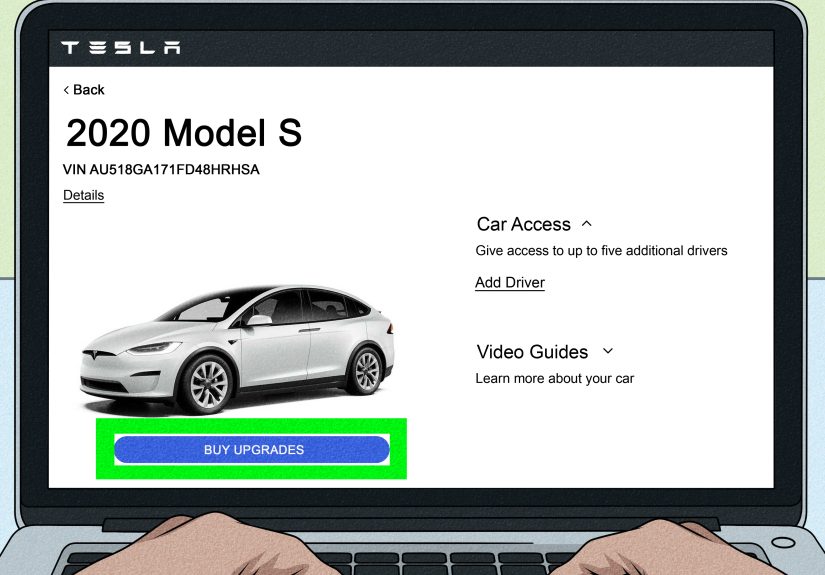
If you own the vehicle or the seller is willing to show you the Tesla app, the app can also help confirm FSD status and eligibility.
In the Tesla app, check areas such as:
- Vehicle > Specs & Warranty
- Upgrades > Software Upgrades
- Manage or Subscribe options for Full Self-Driving (Supervised)
If the app offers a subscription to FSD, that often means the vehicle is eligible, but not currently equipped with permanent FSD. If the app shows active FSD access, check whether it is purchased, subscribed, or part of a temporary trial.
Only the Tesla account that owns the vehicle can manage certain software subscriptions. That means a private seller’s access may not become your access after ownership transfer. Always verify after the car is transferred into your own Tesla account.
How to Tell If a Used Tesla Has Full Self-Driving
Used Tesla shopping is where FSD confusion gets spicy. Many listings say “FSD capable,” “Full Self-Driving,” or “Autopilot” without explaining what is actually included. Some sellers are honest but confused. Some dealers copy old listing templates. Some websites treat FSD like a checkbox, not a legal and software-specific feature. Trust, but verifythen verify again.
Ask the Seller for Proof
Before making an offer, ask for clear photos or a short video showing:
- The touchscreen on Controls > Software
- The Included Package line
- The Full Self-Driving (Supervised) Software section, if visible
- The Additional Vehicle Information screen
- The Tesla app’s Specs & Warranty or software-upgrade page
A seller saying “it has the FSD computer” is not enough. That statement only confirms the vehicle may be technically capable. You need to know whether FSD is included, active temporarily, subscribed, or not included at all.
Check the Tesla Used Inventory Page Carefully
If buying from Tesla’s pre-owned inventory, open the vehicle’s details page and look for the listed self-driving package. Tesla’s own inventory descriptions are generally more reliable than third-party listings, but you should still review the final purchase agreement before delivery.
If buying from a non-Tesla dealer, be extra cautious. Many traditional dealerships do not understand Tesla software packages deeply. They may list “Full Self-Driving Capability” because the car has the FSD computer, not because the paid package is included. That is like saying a kitchen has “dinner capability” because there is a stove. Technically true. Still no tacos.
Does FSD Transfer to a New Owner?
FSD transfer can be confusing because Tesla has offered special transfer promotions at different times. In general, if the previous owner only had an FSD subscription, the new owner should expect to subscribe again using their own Tesla account. If the previous owner purchased FSD outright and did not transfer it to another Tesla under a special program, the vehicle may retain FSD for the next owner.
Because Tesla’s programs can change, buyers should not rely on old forum posts, old YouTube videos, or a seller’s memory from three software updates ago. The best approach is to verify the car’s current included package before purchase and re-check after the vehicle appears in your own Tesla app.
FSD Hardware Generations: Why They Matter
For FSD subscription eligibility, Tesla has required vehicles to have an appropriate FSD or AI computer. Older vehicles with earlier Autopilot computers may need a hardware upgrade before they can run newer FSD software.
If a Tesla has FSD Computer 3.0 or newer, it is more likely to be eligible for FSD (Supervised), depending on region, model, software version, and configuration. If it has older hardware such as Autopilot computer 2.0 or 2.5, it may need an upgrade. Some owners who purchased FSD outright may have been eligible for certain hardware upgrades, while subscription-only users may have different upgrade costs or requirements.
The takeaway is simple: check both hardware and software. Hardware tells you what the car may be able to run. The included package tells you what the car actually has.
FSD vs Autopilot vs Traffic-Aware Cruise Control
Another reason buyers get confused is that Tesla has changed packaging and feature names over the years. Depending on model year and market, a Tesla may include different combinations of driver-assistance features.
Traffic-Aware Cruise Control
Traffic-Aware Cruise Control helps maintain speed and following distance behind another vehicle. It is useful on highways and in traffic, but it is not Full Self-Driving.
Autopilot
Basic Autopilot traditionally combined Traffic-Aware Cruise Control with Autosteer, which assists with lane centering on marked roads. It is still a driver-assistance system and does not make the car autonomous.
Enhanced Autopilot
Enhanced Autopilot, where available, has included features such as Navigate on Autopilot, Auto Lane Change, Autopark, Summon, and Smart Summon. It is more capable than basic Autopilot but still not the same as Full Self-Driving.
Full Self-Driving (Supervised)
FSD (Supervised) is Tesla’s broader driver-assistance package designed to handle more driving situations under active driver supervision. It may navigate city streets, make turns, handle intersections, and follow a route, but the driver must stay alert at all times.
Common Signs a Tesla Does Not Have FSD
A Tesla probably does not include permanent Full Self-Driving if:
- The touchscreen only lists Autopilot or Traffic-Aware Cruise Control.
- The Tesla app shows FSD as an available paid subscription.
- The seller only says “FSD computer” but cannot show “Full Self-Driving Capability” under included package.
- The listing says “FSD capable” instead of “FSD included.”
- The feature has an expiration date.
- The dealer cannot produce screenshots from the car’s Software menu.
“FSD capable” is the phrase to watch. It often means the car can support FSD, not that you get FSD. Those two words can be the difference between a nice bonus and a monthly subscription.
How to Test FSD During a Test Drive
If the car appears to have FSD, you may want to confirm that the feature is actually active. First, review the software screen while parked. Then, if you are legally allowed, comfortable, and in a safe area, check whether the vehicle shows FSD activation controls.
When FSD (Supervised) is enabled, the interface may show a self-driving option and visual path guidance. Tesla describes active FSD with visual cues such as a blue self-driving state or a blue route/path indicator. Menu layouts can vary by software version, so do not panic if the screen looks slightly different from a video you saw online.
During any test, keep your hands ready, your eyes on the road, and your expectations realistic. FSD can be impressive, but it can also make choices that feel awkward, cautious, late, or just plain “why are we doing this, little computer friend?” Driver supervision is not optional.
Why FSD Matters for Tesla Resale Value
Full Self-Driving can affect a Tesla’s resale value, but it usually does not add its full retail price to the car. Used-car buyers often discount FSD because subscriptions are available, pricing changes, transfer rules vary, and many shoppers are unsure how much they will actually use it.
If you are buying, do not overpay unless FSD is clearly included and valuable to you. If you are selling, provide screenshots and documentation to support your asking price. A buyer is more likely to pay extra for FSD when the proof is obvious.
Buyer Checklist: How to Confirm Tesla FSD Before Paying
Use this quick checklist before sending money, signing paperwork, or falling emotionally attached to a red Model Y named “Sparky.”
- Check Controls > Software on the touchscreen.
- Confirm whether the included package says Full Self-Driving Capability.
- Look for Full Self-Driving (Supervised) Software.
- Check Additional Vehicle Information for the Autopilot/FSD computer version.
- Ask whether FSD is purchased, subscribed, or trial-based.
- Check whether there is an expiration date.
- Review the Tesla app if you own the vehicle or the seller can show it.
- Verify again after ownership transfers to your Tesla account.
- Do not rely only on “FSD capable” in a listing.
- Get important claims in writing before purchase.
Frequently Asked Questions
Do all Teslas have Full Self-Driving?
No. Many Teslas have driver-assistance features, and many have hardware that may support FSD, but not every Tesla includes active or purchased Full Self-Driving.
Does “Full Self-Driving Computer” mean the car has FSD?
No. It means the car has hardware designed to support FSD features. You still need to confirm whether Full Self-Driving is included, subscribed, or available as an upgrade.
What does “FSD capable” mean?
It usually means the vehicle has the hardware needed for FSD or can be upgraded to use it. It does not automatically mean the paid software package is included.
Can I add FSD later?
Often, yes, if the vehicle is eligible. Eligible owners can usually subscribe through the Tesla app or the vehicle touchscreen. Hardware upgrades may be required for some older vehicles.
Is Tesla FSD truly self-driving?
No. Tesla’s consumer FSD is supervised. The driver must stay attentive and ready to intervene. It is an advanced driver-assistance system, not a fully autonomous chauffeur.
Real-World Experiences: What Checking Tesla FSD Actually Feels Like
In real life, checking whether a Tesla has FSD is less like solving a mystery and more like reading the fine print on a very fast smartphone with wheels. Most shoppers start with the listing. They see “Full Self-Driving Capability” and immediately picture a futuristic car calmly driving them home while they sip coffee. Then they sit in the car, open the Software screen, and realize the phrase may not mean what they thought it meant.
One common experience is the private-seller screenshot shuffle. The buyer asks, “Does it have FSD?” The seller replies, “Yes, it has the FSD computer.” That sounds convincing until you know the difference. A smart buyer asks for the included package screen. If it shows only Autopilot, the conversation changes quickly. The car may still be excellent, but the price should reflect what is actually included.
Another common experience happens at used-car dealerships. A salesperson may say, “This one has self-driving,” because the car has Autopilot or because the listing software decoded a Tesla option incorrectly. This does not always mean the dealer is trying to mislead anyone. Many non-Tesla dealers simply do not live in the Tesla menu universe every day. They sell trucks, sedans, SUVs, and then suddenly a Model 3 arrives with more software terminology than a laptop. That is why buyers should politely ask to sit in the vehicle and check the screen themselves.
Owners also learn that FSD is not magic. When active, it can feel remarkable on familiar roads. The car may follow navigation, change lanes, slow for traffic, and handle routine turns with surprising confidence. Then, ten minutes later, it may hesitate at a weird intersection, choose a lane too early, or act overly cautious near construction. That is why experienced Tesla drivers treat FSD like a helpful but sometimes overconfident assistant. It can reduce workload, but it does not remove responsibility.
There is also a financial lesson. Some buyers are willing to pay more for a Tesla with purchased FSD because they want the feature long-term. Others prefer a lower-priced car and a monthly subscription when they actually need it, such as for road trips or a trial month. Neither approach is wrong. The mistake is paying for permanent FSD when the car only has temporary access or hardware capability.
The best experience comes from slowing down before buying. Open the menus. Take photos. Ask questions. Compare the touchscreen, app, and paperwork. If anything feels vague, assume it needs verification. A Tesla is already quick enough; your buying decision does not need Ludicrous Mode.
Conclusion
Learning how to tell if a Tesla has Full Self-Driving comes down to one practical skill: knowing where to look and what the wording means. The touchscreen is your best friend. Go to Controls > Software, check the included package, look for Full Self-Driving Capability or Full Self-Driving (Supervised), and confirm whether access is permanent, subscribed, or temporary.
Do not confuse the FSD computer with the FSD software package. Do not rely only on used-car listings. Do not assume “FSD capable” means “FSD included.” And above all, remember that FSD is supervised. Even when the technology feels futuristic, the driver is still the boss, safety monitor, and official snack manager.
If you are buying a used Tesla, verify everything before purchase and again after ownership transfer. A few minutes in the Software menu can save you hundreds or thousands of dollarsand prevent the deeply un-fun experience of discovering that your “Full Self-Driving” Tesla is actually just “Full Self-Driving… if you subscribe.”






 Close
Close