
Table of Contents >> Show >> Hide
- What “Unlocking a Phone” Really Means
- Before You Start: The Big Truth About “Free”
- How to Unlock a Phone for Free: 9 Steps
- Step 1: Figure Out What Kind of Lock You Have
- Step 2: Confirm the Phone Is Paid Off
- Step 3: Make Sure Your Account Is in Good Standing
- Step 4: Check Your Carrier’s Current Eligibility Rules
- Step 5: Gather Your IMEI and Account Information
- Step 6: Submit the Unlock Request the Right Way
- Step 7: Back Up Your Phone and Update the Software
- Step 8: Insert the New SIM or Activate the eSIM
- Step 9: Verify the Phone Works on the New Network
- Common Mistakes to Avoid
- Can You Unlock a Phone Early?
- Why an Unlocked Phone Is Worth the Trouble
- Real-World Experiences With Unlocking a Phone for Free
- Final Thoughts
Getting your phone unlocked for free sounds a little like finding extra fries at the bottom of the bag: delightful, suspiciously lucky, and absolutely worth investigating. The good news is that free phone unlocking is real. The less glamorous news is that it usually does not mean waving a magic wand, downloading a sketchy app, or typing a secret code from a stranger named “FastUnlockKing99.” In the real world, unlocking a phone for free usually means legally removing a carrier lock once your device meets your wireless provider’s rules.
That distinction matters. This guide is about unlocking a phone so it can work on another carrier’s network. It is not about bypassing a forgotten passcode, breaking into a device, or dodging security features. Think of this as the grown-up, legitimate version of phone freedom: the kind that lets you switch carriers, travel more easily, or sell your device without turning the process into a tech-themed crime documentary.
Below, you’ll learn how to unlock a phone for free in nine practical steps, how to avoid common mistakes, and what real people usually experience along the way. Spoiler: the process is often easier than people think, as long as you stop listening to random forums and start listening to your carrier.
What “Unlocking a Phone” Really Means
A locked phone is usually tied to the network of the carrier that sold it. That means the phone may work perfectly fine with that company’s SIM card or eSIM, but refuse to cooperate when you try to switch to another provider. In plain English, your phone has commitment issues, and your carrier is the reason.
An unlocked phone, on the other hand, can generally be activated on a compatible network. That makes it more flexible for switching carriers, using local service while traveling, or boosting resale value. But here’s the key point many people miss: the carrier controls the network lock. Phone makers like Apple and Samsung do not usually decide whether your device gets unlocked for another carrier. So if your phone is locked, the place to start is almost always your mobile provider.
Before You Start: The Big Truth About “Free”
Free unlocking usually means you do not pay a separate unlock fee after your phone becomes eligible. What you often do need is to meet the carrier’s conditions first. Those conditions commonly include paying off the phone, keeping the account in good standing, and waiting a required number of days after activation or purchase.
In other words, “free” is not always instant. It is more like “included once you stop owing everyone money.” Not as catchy, but much more accurate.
How to Unlock a Phone for Free: 9 Steps
Step 1: Figure Out What Kind of Lock You Have
Start by making sure your phone is actually carrier-locked. Many people mix up a screen lock with a network lock, and those are completely different animals. If your phone asks for a PIN, pattern, Face ID, or fingerprint, that is a device security lock. If it rejects another carrier’s SIM or says something like “SIM not supported,” “Network locked,” or “Invalid SIM,” you are probably dealing with a carrier lock.
On iPhone, you can usually check by going to Settings > General > About and looking for Carrier Lock. If it says No SIM restrictions, your iPhone is already unlocked. On many Samsung phones, you can check a network lock status menu under connection settings. Android menus vary by brand, so expect a small scavenger hunt.
Step 2: Confirm the Phone Is Paid Off
This is the part where many unlock dreams go to nap. If your phone is still being financed, leased, or tied to an unpaid installment plan, your carrier may refuse to unlock it. That is especially common with newer devices purchased on monthly payment agreements.
Check your wireless account, billing page, or financing details. If the remaining balance is zero, great. If not, that balance is often the main obstacle between you and your carrier-unlocked future. Some users assume that because they’ve paid their phone bill on time, the device must also be paid off. Those are not the same thing. Your bill and your hardware balance are like cousins, not twins.
Step 3: Make Sure Your Account Is in Good Standing
Carriers often require the associated account to be current. If your line is suspended, your balance is overdue, or there is some billing issue attached to the account, the unlock request may stall out. Fun? No. Common? Very.
This is also the time to make sure the device has not been reported lost, stolen, or linked to fraud. A phone with a bad IMEI history is not likely to unlock smoothly, and it may not be accepted by another carrier even if you somehow get past the first hurdle.
Step 4: Check Your Carrier’s Current Eligibility Rules
Unlock rules are not identical from carrier to carrier, which is why copying your friend’s “easy trick” can go sideways fast. Your provider may require a certain waiting period, active service time, or a request through a specific online portal.
Here are a few examples of the kinds of rules you may run into:
| Carrier or Service | Typical Unlock Pattern |
|---|---|
| AT&T | Commonly requires the device to be paid off, not reported lost or stolen, and purchased more than 60 days ago. |
| T-Mobile | Postpaid devices often need to be active for at least 40 days and fully paid off; prepaid rules are different and usually stricter. |
| Verizon | Rules vary by purchase type; prepaid devices commonly stay locked much longer, while some other Verizon-purchased devices unlock automatically once requirements are met. |
| Xfinity Mobile | Phones are generally expected to be activated for at least 60 days, paid off, and on an account with no past-due balance. |
| UScellular | Some postpaid devices unlock automatically after the locking period, and prepaid/postpaid requirements differ by device type. |
| Google Fi / Spectrum BYOD | If you are bringing your own phone, it generally needs to already be unlocked by the previous carrier. |
The smart move is to check your carrier’s current unlock page instead of relying on internet folklore from 2021. Mobile policies change, and your phone should not have to suffer because somebody’s cousin posted outdated advice between photos of lunch.
Step 5: Gather Your IMEI and Account Information
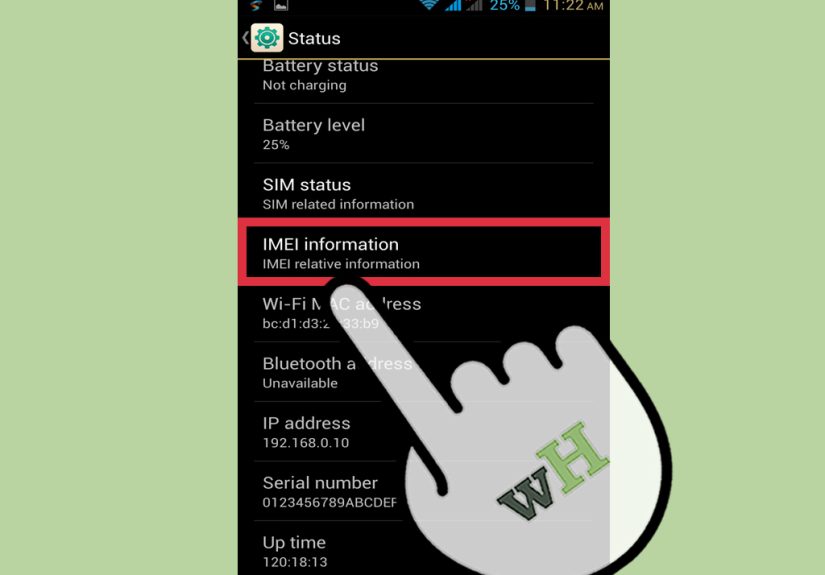
Most carriers need your phone’s IMEI number, which is the unique identifier for the device. You can often find it by dialing *#06#, or by checking Settings > About. You may also need your account number, phone number, billing ZIP code, and login credentials.
Do this before you start the request. Nothing kills momentum like finally reaching the right support page, only to discover you now need an account PIN you last used during the Bronze Age.
Step 6: Submit the Unlock Request the Right Way
Some carriers unlock phones automatically once eligibility requirements are met. Others want you to submit a request online, through the app, via customer service, or from the account owner’s profile. Follow the official route. That means your carrier’s website, app, or support team, not a random ad promising “instant unlock in 30 seconds.”
When submitting the request, double-check every number you enter. One wrong IMEI digit can send the whole process into paperwork purgatory. If the carrier tells you the phone is already unlocked, do not celebrate too early. Move to the next steps and test it for real.
Step 7: Back Up Your Phone and Update the Software
Some unlocks happen remotely and quietly in the background. Others may require a restart, a software refresh, or reactivation with a new SIM or eSIM. Back up your device before making changes, especially if you are switching carriers or resetting network settings.
Install any available iOS or Android updates too. Old software can make a freshly unlocked phone act like it missed the memo. If the carrier has already removed the lock but your phone still behaves like a drama queen, outdated software is one of the first things to check.
Step 8: Insert the New SIM or Activate the eSIM
Once the carrier confirms the unlock, test the phone with a SIM card from another compatible carrier or complete eSIM activation with the new provider. Restart the device if needed. On iPhone, you may simply insert the new SIM and let the phone recognize it. On Android, the process can vary depending on the brand, carrier, and whether the phone supports remote unlock features.
If you are switching to a provider like Google Fi or Spectrum Mobile, compatibility matters just as much as unlocking. A phone can be unlocked and still not support every band or feature on the new network. So yes, unlocking is important, but compatibility is the plot twist that keeps tech support employed.
Step 9: Verify the Phone Works on the New Network
Do not stop at “it turned on.” Make a call. Send a text. Test mobile data. Confirm voicemail, eSIM settings, and Wi-Fi calling if those matter to you. A phone that is technically unlocked but not fully configured is like buying a bicycle with one pedal: progress is possible, but nobody looks happy doing it.
If the phone still says it is locked, contact the original carrier again and ask them to verify the unlock completed in their system. If the device is unlocked but service still fails, the issue may be compatibility, activation, or a bad SIM rather than the lock itself.
Common Mistakes to Avoid
Confusing Carrier Unlocking With Screen Unlocking
This is the big one. If you forgot your phone passcode, the carrier cannot wave that away. Carrier unlocking removes network restrictions, not personal security settings.
Paying Third Parties Too Soon
Many people pay an online service before checking whether the carrier would unlock the phone for free anyway. That is like paying someone to open a door that was already unlocked. Always try the official route first.
Ignoring the New Carrier’s Compatibility Checker
An unlocked phone is not automatically a perfect match for every network. Check IMEI compatibility before you cancel your old service or transfer your number.
Requesting an Unlock From the Wrong Company
If the phone was originally sold by Carrier A but you are currently using it on Carrier B, Carrier B may not be able to unlock it. The original seller often controls the lock. Trace the phone’s origin before spending an afternoon in support-chat limbo.
Can You Unlock a Phone Early?
Sometimes, but not always. Certain carriers make exceptions for military deployment or special account circumstances. Some prepaid brands may also publish separate rules, and in some cases an early unlock may not be free. So if your phone is not yet eligible, the answer is not automatically “never,” but it is often “not yet.”
If you need flexibility right away, ask customer support whether there is a temporary unlock option, an exception for travel, or any documented policy for early eligibility. Be polite. Support agents are much more likely to help people who sound like humans and less like malfunctioning megaphones.
Why an Unlocked Phone Is Worth the Trouble
Once your phone is unlocked, it becomes easier to switch carriers, compare cheaper plans, use travel SIMs, and resell the device later. That last one matters more than people think. Buyers love unlocked phones because they can pop in a compatible SIM without inheriting your old carrier drama.
In short, unlocking gives you leverage. It turns the phone from “hardware attached to a plan” into “hardware you can actually move around.” That is a small but meaningful difference, especially when prices rise or coverage disappoints.
Real-World Experiences With Unlocking a Phone for Free
One of the most common experiences people have with unlocking a phone for free is discovering that the process is less technical than expected and more administrative than expected. They picture secret codes and hidden menus, but the real challenge is usually checking account status, waiting out a service period, or confirming that the phone is truly paid off. A lot of users start the process feeling nervous because the phrase “unlock a phone” sounds complicated. Then they realize the hardest part is remembering which email address they used when setting up the wireless account three years ago.
Travelers often notice the value of unlocking first. Someone planning an international trip may assume they can just land, buy a local SIM, and save money. Then they test another SIM at home and discover the phone is still locked. That can be frustrating, but it is also a useful wake-up call. The people who have the smoothest experience are usually the ones who test everything before they travel, not after they are standing in an airport trying to translate a carrier error message while running on no sleep and one questionable sandwich.
Another frequent experience comes from people switching to a cheaper carrier. They hear about a great bring-your-own-phone plan, get excited, and then learn that “bring your own phone” quietly means “bring your own unlocked phone.” Once they get through the official unlock steps, many are surprised by how straightforward the switch becomes. The relief is real. There is something oddly satisfying about realizing the phone you already own still has plenty of life left and does not need to be replaced just because you want a better monthly deal.
Families also run into this when passing phones down. A parent upgrades, gives the old device to a teenager or another family member, and assumes that is the end of the story. Not quite. If the phone is still carrier-locked, the new user may be stuck on one network. Unlocking it first makes that hand-me-down dramatically more useful. In many cases, the device goes from “drawer decoration” to “perfectly good backup phone” after one successful request.
Sellers see the difference too. People listing a phone online often learn that buyers ask one question almost immediately: “Is it unlocked?” An unlocked phone usually attracts more interest and better offers because it gives the next owner more options. That means even if you are not switching carriers today, unlocking your phone once it is eligible can pay off later. Not in the lottery-winner sense, sadly, but in the “this resale listing suddenly became much less painful” sense.
Final Thoughts
If you want to unlock a phone for free, the safest and smartest path is also the least flashy: verify the lock type, pay off the device if needed, confirm eligibility, use the official carrier process, and test the phone on a compatible new network. No hacks. No mystery software. No “one weird trick” from a banner ad that looks like it was designed in a basement in 2007.
Done properly, unlocking a phone is less about hacking hardware and more about finishing paperwork. That may not be thrilling, but it is effective. And unlike shady shortcuts, it tends to end with your phone working, your account intact, and your blood pressure still within a socially acceptable range.





 Close
Close