
Table of Contents >> Show >> Hide
- What Is Reddit RemindMeBot?
- Why People Use the Reddit RemindMeBot
- Basic Reddit RemindMeBot Command
- Step-by-Step: How to Use the Reddit RemindMeBot
- Popular RemindMeBot Examples
- Can You Add a Custom Message?
- Can You Send RemindMeBot a Message Instead of Commenting?
- How to Check Your Existing Reminders
- How to Delete or Cancel a Reminder
- Does RemindMeBot Support Repeating Reminders?
- Why RemindMeBot Sometimes Does Not Work
- Best Practices for Using RemindMeBot
- Reddit RemindMeBot vs. Reddit’s Built-In Reminder Features
- Is RemindMeBot Still Worth Using?
- Real-World Experiences Using the Reddit RemindMeBot
- Conclusion
Reddit moves fast. One minute you are reading a wild prediction in a gaming thread, and the next minute you are wondering whether that stranger was a genius, a prophet, or just aggressively confident before breakfast. That is exactly where Reddit RemindMeBot shines. It gives you a simple way to come back later and check a post, comment, or conversation without trusting your memory, which is brave but often wildly optimistic.
In this step-by-step guide, you will learn how to use the Reddit RemindMeBot, what command formats usually work, how to customize reminders, where your alerts may show up, and what to do if the bot ignores you like a cat with a law degree. Whether you are tracking a product launch, following a legal update, waiting for sports results, or just trying to remember a thread you swore you would revisit, this guide will help you use the bot with confidence.
What Is Reddit RemindMeBot?
RemindMeBot is a long-running Reddit bot that lets users create reminders tied to a specific post or comment. You leave a command in a comment or send a message using the bot’s accepted format, and the bot schedules a reminder for later. When the time arrives, it sends you a notification so you can return to the original discussion.
That sounds simple because it is simple. And honestly, that is part of the charm. It is not trying to become your life coach, tax preparer, or mindfulness guru. It just remembers things for you, which is already more than some group chats manage.
Why People Use the Reddit RemindMeBot
People use RemindMeBot for all kinds of practical reasons. Some want to check whether a rumor came true. Others want to revisit advice in a discussion after enough time has passed to see whether it worked. It is also popular for keeping tabs on:
Predictions and outcomes
You see a bold claim like, “This stock will double in six months,” or “That team is definitely making the playoffs.” Instead of arguing endlessly, you can set a reminder and come back later with receipts.
Product launches and updates
If someone says a feature, app, game, or gadget will launch soon, a reminder helps you circle back when there is something real to evaluate.
Advice threads
Reddit is full of “try this and update us” moments. A reminder helps you return to see whether the original poster came back with an update or whether the comment section turned into chaos with punctuation.
Personal follow-up
You can also use the bot as a tiny planning tool. For example, you might remind yourself to check application deadlines, revisit a deal, or return to a long resource thread later.
Basic Reddit RemindMeBot Command
The most common command format is straightforward:
RemindMe! 3 days
You can also add an optional note:
RemindMe! 3 days "check whether the update fixed the bug"
This tells the bot when to remind you and, if you include a custom message, what the reminder is about. That optional note is useful when you set multiple reminders and later need to remember why Past You made this decision. Past You means well, but Past You is not always helpful.
Step-by-Step: How to Use the Reddit RemindMeBot
Step 1: Find the post or comment you want to revisit
Open the Reddit thread where you want to set the reminder. This could be a post, a comment, or a reply chain that you want to check again in the future.
Step 2: Reply with the command
In the comment box, type your command using a clear time frame. For example:
RemindMe! 1 week
Or:
RemindMe! 6 months "see if this prediction was accurate"
Keep the command clean and readable. In most cases, natural time expressions such as minutes, hours, days, weeks, months, or years are easiest to use.
Step 3: Post the comment
Submit your comment like normal. If the subreddit allows the trigger and the bot sees it, RemindMeBot should respond with a confirmation. That reply usually tells you when the reminder is scheduled and often includes shortcuts for managing the reminder.
Step 4: Watch for confirmation
This part matters. If you do not receive a confirmation, do not assume the reminder was set. Some subreddits block bot triggers, remove certain command formats, or prevent bot replies from appearing normally. If there is no confirmation, troubleshoot before moving on.
Step 5: Receive your reminder later
When the reminder time arrives, the bot sends you the reminder so you can jump back to the original post or comment. On current Reddit, that alert may appear through chat or Reddit’s newer messaging flow rather than the older private-message system many older tutorials mention.
Popular RemindMeBot Examples
Here are a few examples of practical commands:
RemindMe! 2 hours "check the live thread after the announcement"
RemindMe! 10 days "see whether the package arrived"
RemindMe! 1 month "follow up on the job application thread"
RemindMe! 1 year "did this person actually keep their New Year resolution?"
You may also see users write variations like !RemindMe 3 days. In practice, accepted formats can vary slightly depending on bot parsing and subreddit conditions, but the safest move is to keep the phrase tight, include the exclamation mark, and avoid adding unnecessary clutter.
Can You Add a Custom Message?
Yes, and you probably should. A custom note saves you from opening a reminder months later and wondering what exactly you were supposed to care about. The note usually goes in quotation marks after the time period.
Example:
RemindMe! 90 days "see whether the new phone price drops"
That kind of custom message makes the reminder far more useful, especially if you have multiple reminders active at the same time.
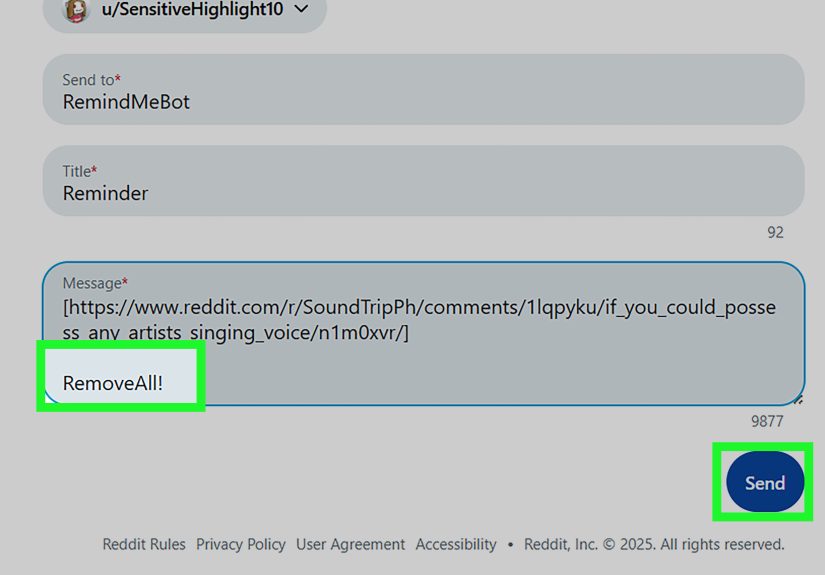
Can You Send RemindMeBot a Message Instead of Commenting?
Yes, message-based use has long been part of the bot’s feature set. Older RemindMeBot instructions explain that users can send the same reminder command as a direct message to the bot. That approach is especially helpful in communities that suppress public bot commands or when you do not want to clutter a thread with a reminder comment.
However, here is the modern twist: Reddit has changed its messaging system, and bot messages now commonly route through Reddit Chat rather than the classic private-message setup many older posts describe. So if you want the smoothest experience, make sure your Reddit chat settings allow the bot to contact you.
How to Check Your Existing Reminders
If you have set several reminders and want to see what is still active, RemindMeBot historically supports a command to list them. A common management command is:
MyReminders!
This usually returns a list of your active reminders and may include links or instructions for removing them. It is a handy feature when you have gone on a reminder-setting spree and your future self deserves a little organization.
How to Delete or Cancel a Reminder
If you no longer need a reminder, there has traditionally been a removal command such as:
Remove! 123
In that example, the number refers to the reminder ID listed in your reminder summary. If the bot’s confirmation or reminder list includes a delete link, using the provided management link is usually the easiest option.
This is especially useful when a thread gets resolved early, a rumor is proven false ahead of schedule, or you simply realize you do not need a reminder in 2049 about whether Steve from the internet ever learned to bake bread.
Does RemindMeBot Support Repeating Reminders?
Yes, advanced users may also come across a repeating reminder command, often written as RemindMeRepeat!. This creates reminders that repeat on a set interval until you stop them. That is not necessary for basic Reddit use, but it can be convenient if you regularly revisit a discussion series, weekly update thread, or recurring event.
Still, for most people, a one-time reminder is the sweet spot. Clean. Simple. Minimal chaos.
Why RemindMeBot Sometimes Does Not Work
If the bot does not reply, there are several possible reasons.
The subreddit blocks the trigger
Some communities remove the trigger word, suppress bot activity, or use automated moderation rules that interfere with activation. If a public comment fails, try using the bot through its direct messaging or chat path instead.
Your message settings block the bot
Reddit’s chat and privacy settings can affect whether you receive reminder messages. If chat requests are restricted too tightly, the bot may not be able to deliver reminders the way you expect.
Your account is limited
New accounts, low-karma accounts, or accounts flagged for spam-like behavior may face messaging restrictions. If your Reddit messaging features are already limited, bot interactions can become less reliable.
You used an unclear format
Bot commands work best when the wording is simple. Use a clear time expression and avoid burying the command inside a wall of text. The cleaner the command, the better your odds.
The bot or Reddit is having a rough day
Sometimes the issue is not you. Bots can go down, Reddit can change APIs, and internet infrastructure occasionally behaves like it was assembled by raccoons with deadlines. If a command that normally works suddenly fails, check whether other users are reporting the same issue.
Best Practices for Using RemindMeBot
Be specific with timing
Use clear time windows such as 2 days, 3 months, or 1 year. Specific timing reduces confusion and makes reminders easier to trust.
Add context in the note
Custom notes make your reminders far more valuable. A reminder without context can feel like receiving a sticky note from a stranger who somehow knows your username.
Avoid spamming threads
If a community dislikes reminder commands in public comments, respect that. Use direct bot messaging or another reminder tool if the subreddit culture clearly discourages public bot use.
Check your chat settings
Because Reddit messaging has evolved, it is smart to confirm that you can receive chat-based bot notifications. This is one of the biggest differences between older guides and current Reddit behavior.
Reddit RemindMeBot vs. Reddit’s Built-In Reminder Features
Reddit sometimes offers built-in reminder features for specific experiences, such as AMA event reminders. Those are useful, but they are not the same as RemindMeBot. Built-in reminders tend to be tied to Reddit product features and event flows. RemindMeBot is more flexible because it lets users create reminders around everyday posts and comments across normal discussions.
In other words, built-in reminders are like a scheduled announcement. RemindMeBot is more like your tiny internet assistant whispering, “Hey, remember that spicy thread you wanted to revisit?”
Is RemindMeBot Still Worth Using?
Yes, especially if you spend time in fast-moving threads where outcomes matter more than hot takes. The bot remains one of the easiest ways to turn Reddit from a scroll-and-forget platform into a place where you can actually follow up on claims, updates, and long-running stories.
The biggest thing to remember is that Reddit’s messaging environment has changed. So if you are following an older tutorial, do not be surprised if it talks about private messages while your reminder lands in chat instead. The core idea remains the same, but the delivery path has modernized.
Real-World Experiences Using the Reddit RemindMeBot
One of the most common ways people experience RemindMeBot is through prediction threads. Someone posts a confident take about politics, technology, sports, investing, or entertainment, and dozens of readers quietly drop reminder commands instead of arguing. It is a clever social move. Rather than debating forever, users simply bookmark the moment in time and return later when reality has had a chance to do the talking. In that sense, RemindMeBot is not just a reminder tool. It is a patience tool, which may be even rarer on Reddit.
Another common experience is using the bot on advice threads. Maybe someone shares a detailed guide for fixing a home problem, improving a workflow, or dealing with a difficult situation. In the comments, another user suggests a practical solution and asks the original poster to report back. A reminder becomes the easiest way to remember that thread without manually saving links you will absolutely forget to organize later. When the reminder arrives, there is often a strange little thrill. You get to revisit the scene like a detective returning to the evidence board.
People also use RemindMeBot for shopping and product research. If someone claims a laptop will go on sale, a game will improve after a patch, or a phone issue will be fixed in the next update, a reminder lets you check back after the dust settles. This is especially useful for buyers who do not want to make snap decisions based on first impressions. Instead of trusting launch-day hype or doom, they give the story time to mature. Frankly, more internet decisions would improve if we all added twenty percent less panic and one well-timed reminder.
There is also a subtle emotional side to the bot. Some users set reminders on wholesome threads, recovery updates, long-term projects, or creative journeys because they genuinely want to know how things turn out. That follow-up feeling can be surprisingly human. The bot may be automated, but what it enables is a kind of delayed curiosity that makes the platform feel more connected. You are not just consuming content. You are participating in a timeline.
Of course, the experience is not always perfect. Some users run into subreddits that block the trigger. Others set a reminder and then forget to check whether the bot confirmed it. Some only learn later that Reddit changed where bot messages appear, so they spend ten confused minutes hunting for a reminder in the wrong inbox. But even with those hiccups, the overall experience is still useful and memorable. Once people figure out the format and delivery quirks, they tend to keep using it.
The funny part is that many users start with one reminder as a novelty and then turn into collectors. First it is one reminder about a prediction thread. Then it is one for a product release, one for a follow-up comment, one for a personal deadline, and suddenly their future inbox looks like a time capsule curated by an overcaffeinated version of themselves. Used well, though, that is exactly the value. RemindMeBot helps you return to the conversations that actually mattered.
Conclusion
If you want a simple way to revisit posts, verify predictions, or follow long-running threads, learning how to use the Reddit RemindMeBot is well worth your time. The basic process is easy: enter the command, choose the timing, add a note if needed, and make sure you receive a confirmation. From there, the bot does the remembering for you.
Just keep one important detail in mind: older instructions may talk about classic direct messages, while current Reddit behavior often routes bot messages through chat. Once you understand that difference, using RemindMeBot becomes much easier. Set smart reminders, add helpful notes, and enjoy the rare internet luxury of actually following up.




 Close
Close