
Table of Contents >> Show >> Hide
- Why VGA on an ESP32 Is So Interesting
- The Big Upgrade: From Bit-Banging to Peripheral-Driven Video
- How the ESP32 Creates VGA Color
- ESP32 vs. ESP32-S3: Not All “ESP32” Boards Are the Same
- Resolution, Color Depth, and the RAM Reality Check
- What You Can Build With ESP32 VGA
- Hardware Tips for Cleaner ESP32 VGA
- Software Tips for Better Output
- Why This Still Matters in a World of HDMI
- Common Problems and Practical Fixes
- Project Experience: Lessons From Building Better ESP32 VGA
- Conclusion
The ESP32 has always had a bit of “tiny board, big attitude” energy. It costs less than a fancy coffee, connects to Wi-Fi, speaks Bluetooth, runs fast enough to embarrass older microcontrollers, andbecause makers are makershas been persuaded to output VGA video. Not “blink an LED on a monitor” video, either. We are talking about real graphics, retro-computer terminals, simple games, colorful demos, and development boards that can drive old-school displays with surprising confidence.
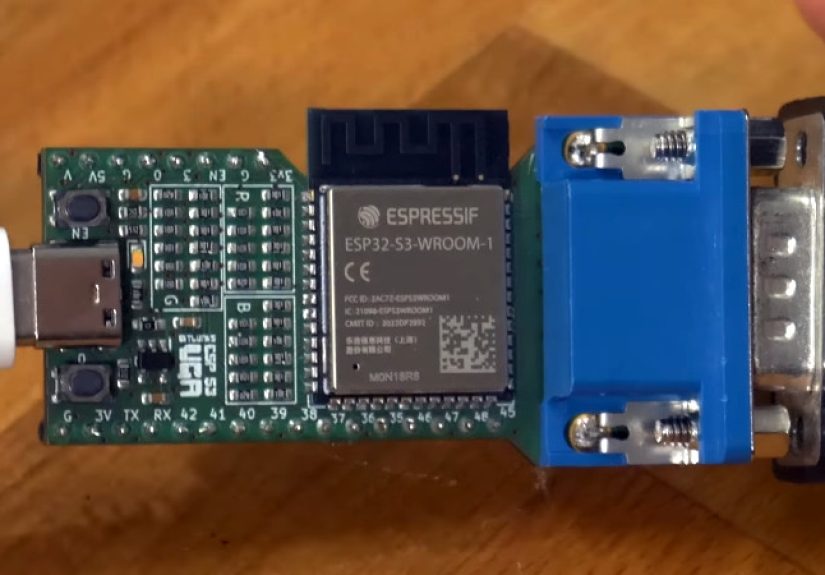
The idea behind Much Better VGA From An ESP32 is simple: squeeze higher-quality analog video out of a microcontroller that was never marketed as a graphics card. The trick is not magic. It is clever use of ESP32 peripherals, careful timing, resistor-based digital-to-analog conversion, smart memory choices, and software libraries that do the ugly work so your project can look like a tiny 1980s computer instead of a nervous oscilloscope trace.
And yes, VGA is old. So are cast-iron pans, vinyl records, and the command line. Old does not mean useless. VGA remains wonderfully hackable because the signal is understandable: red, green, blue, horizontal sync, vertical sync, and timing strict enough to keep you humble. Put that together with an ESP32, and suddenly a desk drawer full of forgotten monitors becomes a playground.
Why VGA on an ESP32 Is So Interesting
At first glance, VGA and ESP32 seem like an odd couple. VGA was designed for computers with dedicated video hardware. The ESP32 is a microcontroller meant for embedded systems, sensors, wireless gadgets, and IoT projects. Yet the pairing works because VGA is fundamentally a timing problem, and the ESP32 has hardware blocks that can shovel data out quickly without forcing the CPU to manually wiggle pins for every pixel.
Classic 640×480 VGA at 60 Hz uses a 25.175 MHz pixel clock, with defined horizontal and vertical blanking intervals. That means the video source must repeatedly send visible pixels, then pause for sync and porch timing, line after line, frame after frame. A general-purpose microcontroller can struggle if it tries to do all of that in software. Miss the rhythm, and the monitor may show rolling, tearing, shimmering, or the dreaded black screen of “nice try, buddy.”
The ESP32’s advantage is that peripherals such as I2S in LCD or parallel mode can stream data through DMA. Instead of asking the CPU to babysit each pixel, the system can prepare buffers and let hardware push them out with more stable timing. That is where “better VGA” starts: not by making the CPU work harder, but by making the right peripheral do the boring, high-speed job.
The Big Upgrade: From Bit-Banging to Peripheral-Driven Video
Early microcontroller video projects often relied on bit-banging. That approach can be fun in the same way juggling knives is fun: impressive, educational, and not something you want in a product demo five minutes before guests arrive. Bit-banging uses code loops to toggle pins at exact times. It is fragile because interrupts, memory access, and tiny timing variations can ruin the signal.
Better ESP32 VGA projects lean on the chip’s hardware features. The I2S peripheral, traditionally associated with audio, can be configured to output parallel data. That makes it useful for generating pixel streams. DMA helps feed that stream continuously. The result is smoother output, less CPU panic, and more room for actual application codedrawing sprites, updating a terminal, reading a keyboard, or making a tiny game where the player is definitely not just a square with dreams.
Libraries such as bitluni’s ESP32Lib and FabGL helped make this practical for everyday builders. ESP32Lib focuses on high-performance graphics features such as sprites, 3D examples, sound, and game controller support. FabGL goes even broader, offering VGA output, PS/2 keyboard and mouse support, audio, GUI tools, terminal features, and game-oriented components. In other words, you do not have to begin your weekend by becoming a video timing monk.
How the ESP32 Creates VGA Color
VGA uses analog color channels. Each red, green, and blue line expects a voltage level, not a neat little digital “0” or “1.” The ESP32, however, outputs digital GPIO signals. The bridge between those worlds is usually a simple resistor DAC.
A resistor DAC converts multiple digital output bits into stepped analog voltages. More bits mean more possible brightness levels per color channel. A very simple setup might use one bit each for red, green, and blue, giving only eight colors. A more capable design can use multiple bits per channel, producing richer color. This is why some ESP32 VGA boards and examples mention 6-bit, 8-bit, 14-bit, or even 16-bit color approaches, depending on the chip, board, wiring, library, and memory strategy.
The resistor network matters. Values that are too high can make the image dim. Values that are too low can draw more current than is wise for the GPIO pins. The goal is a signal bright enough for the monitor while staying friendly to the microcontroller. VGA may be forgiving compared with modern high-speed digital video, but it still rewards clean wiring and sensible electrical choices.
ESP32 vs. ESP32-S3: Not All “ESP32” Boards Are the Same
One confusing part of the ESP32 universe is the name itself. “ESP32” can refer to the original ESP32, but people also casually use it for later chips such as the ESP32-S2, ESP32-S3, ESP32-C3, ESP32-C6, and others. These chips do not all have identical cores, memory layouts, peripherals, or display capabilities.
That matters for VGA. A project written for the original ESP32 may not run unchanged on an ESP32-S3. The S3 has different peripheral behavior, different strengths, and different board designs. Some newer ESP32-S3 VGA boards include refreshed hardware, USB-C, built-in buttons, and improved color output. That makes the S3 attractive for more ambitious video projects, but it also means you should check the library, board pinout, and exact chip support before ordering parts like an optimistic raccoon with a shopping cart.
The phrase “much better VGA” often points to this newer generation of experiments: more color, higher practical resolutions, cleaner board design, and better software support. It is not just “can an ESP32 do VGA?” anymore. It is “how far can we push it before physics, RAM, and monitor tolerance start giving us side-eye?”
Resolution, Color Depth, and the RAM Reality Check
Video quality is a balancing act. Resolution, color depth, refresh rate, and memory usage all pull in different directions. A 320×240 display mode is much easier to store and update than 1024×768. A 1-bit monochrome buffer is tiny compared with a 16-bit color framebuffer. More colors look nicer, but they cost memory and bandwidth.
This is where many ESP32 VGA projects become genuinely interesting. You can choose a lower resolution with more color, a higher resolution with fewer colors, or a tile/text approach that avoids storing every pixel as a full-color value. Retro-style projects often benefit from these constraints. A crisp text terminal, BASIC interpreter, game menu, dashboard, or pixel-art demo does not always need millions of colors. Sometimes 16 or 64 colors are enough to look charmingand to avoid turning the microcontroller into a tiny space heater.
External PSRAM can help, especially on boards designed for richer graphics or emulation. Still, PSRAM is not a magic bottomless backpack. Bandwidth, latency, and DMA compatibility matter. The best designs use memory carefully: buffers where needed, compact color formats, sprites where useful, and static assets stored efficiently.
What You Can Build With ESP32 VGA
Retro Computers and Terminals
One of the most natural uses for ESP32 VGA is a retro-style computer. Add a PS/2 keyboard, display text on a VGA monitor, include sound, and suddenly the ESP32 feels like a tiny home computer from an alternate timeline where 1983 accidentally discovered Wi-Fi.
FabGL-based projects show how practical this can be. Developers have built ANSI terminals, BASIC-style systems, emulators, and command-driven interfaces. A VGA monitor and keyboard give embedded projects a full human interface without needing a laptop, web app, or phone screen.
Games and Demos
The ESP32 is not a PlayStation. It is not trying to be. But for simple games, sprite demos, tile maps, retro shooters, puzzle games, and educational graphics, it is plenty of fun. VGA output gives these projects immediate personality. A blinking OLED says “prototype.” A VGA monitor says “I built a computer in my garage and it has opinions.”
Dashboards and Instruments
VGA can also be practical. A workshop monitor can show sensor data, network status, machine telemetry, weather information, serial logs, or home automation controls. Unlike tiny displays, a VGA monitor is readable from across the bench. And because old monitors are often cheap or free, the display budget can remain pleasantly low.
Hardware Tips for Cleaner ESP32 VGA
The difference between “it technically works” and “that actually looks good” often comes down to hardware discipline. Keep the wiring short. Use a proper VGA connector or a well-designed breakout. Avoid breadboard spaghetti for final builds, especially at higher pixel rates. Breadboards are wonderful for slow signals and mild chaos, but VGA timing can expose every loose connection like a detective with a flashlight.
A resistor DAC should use reasonably accurate resistor values. You do not need laboratory-grade parts for a hobby build, but wildly mismatched resistors can affect brightness and color balance. Ground matters too. A weak or noisy ground connection can cause shimmer, ghosting, or unreliable sync. Decoupling capacitors near the ESP32 board are not decorative; they are the tiny peacekeepers of embedded electronics.
Power supply quality is another common culprit. ESP32 boards can draw bursty current, especially with Wi-Fi enabled. If your VGA image becomes unstable when networking starts, the issue may not be your drawing code. It may be power noise or timing contention. A stable 3.3 V rail, adequate USB supply, and sensible layout can save hours of debugging that would otherwise end with you accusing innocent semicolons.
Software Tips for Better Output
Start with a known-good example from a maintained library. Do not begin by inventing a video driver unless that is the actual goal. First confirm your board, pins, resistor network, and monitor work with a basic test pattern. Then move to text, graphics, sprites, or input devices.
Choose a display mode that fits the project. For a terminal, text clarity matters more than color depth. For a game, smooth animation may matter more than resolution. For a dashboard, stability and readability are king. Resist the temptation to chase the largest possible mode simply because a README says it can be done. The best mode is the one that works reliably on your monitor and leaves enough CPU time for the rest of the application.
Also watch interrupts and background tasks. Wi-Fi, Bluetooth, file I/O, and display generation can compete for resources. If the screen glitches when your code does heavy work, consider reducing resolution, optimizing drawing routines, using double buffering carefully, or scheduling updates more predictably.
Why This Still Matters in a World of HDMI
Modern displays are digital, sharp, and convenient. HDMI is everywhere. So why bother with VGA? Because VGA is educational and accessible. It teaches timing, analog levels, sync signals, memory trade-offs, and hardware/software cooperation. You can see the relationship between code and signal in a way that feels direct.
There is also a sustainability angle. Many older VGA monitors still work. Giving them a second life in workshops, classrooms, hackerspaces, and hobby projects is better than letting them gather dust. An ESP32 VGA project can turn old hardware into a useful display for experiments, retro games, or embedded interfaces.
Most importantly, it is fun. The maker world runs on curiosity, thrift, and the occasional decision to do something just because it should not be this easy. ESP32 VGA lives right in that sweet spot.
Common Problems and Practical Fixes
The Monitor Shows Nothing
Check the sync pins, ground connection, and display mode first. Some monitors are picky about timings. Try a lower, standard mode such as 640×480 or a known library example. Confirm that the GPIO pins in your code match your wiring.
The Image Is Too Dark
Your resistor values may be too high, or the monitor may expect stronger analog levels. Compare your circuit with a proven schematic. Do not simply remove all resistors and hope for the best; GPIO current limits still matter.
The Image Flickers or Tears
This often points to timing instability, memory bandwidth issues, or too much CPU activity interfering with display output. Reduce resolution or color depth, simplify drawing, and test without Wi-Fi or other heavy tasks.
Colors Look Wrong
Check bit order, resistor placement, and VGA pin mapping. A swapped red and blue line can make your demo look like it was color-graded by a confused aquarium.
Project Experience: Lessons From Building Better ESP32 VGA
The first practical lesson is to respect the monitor. Makers often assume that if the ESP32 produces “roughly VGA-ish” signals, every screen will politely cooperate. Some will. Others behave like a museum curator inspecting a forged painting. Older LCD monitors may accept a surprisingly wide range of timings, while certain newer displays refuse anything that does not smell like a standard mode. When testing, use at least two monitors if possible. If one screen fails, the project may still be fine.
The second lesson is that wiring quality matters earlier than expected. A quick jumper-wire build can prove the concept, but once you push color depth or resolution, the mess becomes part of the circuit. Shorter wires, solid ground, and a proper connector can transform a fuzzy, unstable image into something you would actually show another human. If a project works only when you press one wire with your finger, congratulations: you have built a touch-sensitive debugging ritual, not a stable video output.
The third lesson is to start small. A test pattern is more valuable than a half-finished game engine. Draw color bars. Draw a grid. Draw text. Confirm that the sync is stable. Then add keyboard input, sprites, sound, SD card loading, or networking. Each layer introduces new ways to break timing or memory assumptions. Building in stages makes the project less mysterious and much less likely to end in dramatic sighing.
The fourth lesson is that limitations can improve the design. A tiny color palette encourages stronger visual style. Lower resolution encourages bold fonts and clean layouts. A text-mode interface can be faster, sharper, and more useful than a full bitmap GUI. Many of the best ESP32 VGA projects feel charming because they lean into retro constraints instead of pretending to be a modern desktop.
The fifth lesson is to pick the right library for the job. If you want quick graphics, sprites, and Arduino-friendly examples, ESP32Lib is attractive. If you want a broader environment with VGA, PS/2 input, terminal behavior, GUI components, sound, and retro-computing possibilities, FabGL is a strong choice. For ESP32-S3-specific boards, make sure the library and examples explicitly support your chip and hardware revision. “ESP32 compatible” is not always specific enough.
The sixth lesson is that power and heat should not be ignored. VGA output, Wi-Fi, sound, and input devices can make the board work harder than a simple sensor node. Use a reliable USB cable and power source. Cheap charge-only cables and weak ports can create strange problems that look like software bugs. Before rewriting half your code, try a better cable. It is not glamorous, but neither is losing an evening to a cable that belongs in the junk drawer hall of shame.
The final lesson is that ESP32 VGA is most rewarding when treated as a learning platform. You get embedded programming, digital-to-analog conversion, display timing, memory management, and user-interface design in one compact project. The result may not replace a dedicated graphics system, but that is not the point. The point is that a small wireless microcontroller can become a video-generating, keyboard-reading, sound-making mini computer. That is delightful engineeringand delight is a perfectly valid specification.
Conclusion
Much Better VGA From An ESP32 is more than a clever hack. It is a reminder that microcontrollers are not limited to blinking LEDs and reading sensors. With the right peripherals, libraries, and hardware design, the ESP32 can generate surprisingly capable VGA output for retro computers, games, dashboards, terminals, and educational projects.
The best results come from understanding the trade-offs. Higher resolution costs memory and bandwidth. More color requires better resistor DAC design and smarter buffering. Stable timing depends on using hardware peripherals wisely. But when everything lines up, the reward is fantastic: a tiny board driving a real monitor with graphics that feel far bigger than the hardware suggests.
Note: This article is written for educational and web publishing purposes. Always verify board pinouts, resistor values, and library compatibility before wiring an ESP32 or ESP32-S3 VGA project.




 Close
Close